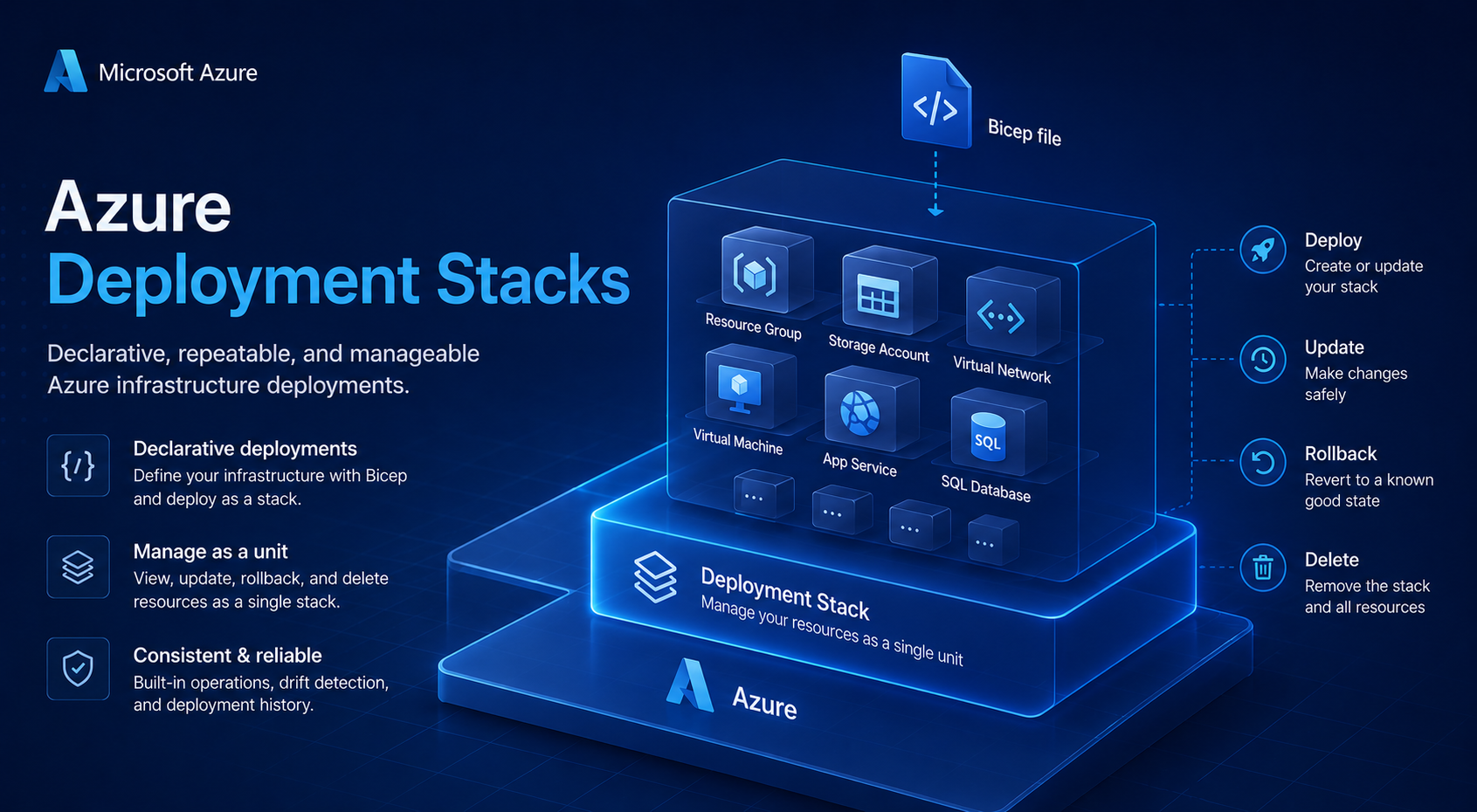
Azure Deployment Stacks - What denyWriteAndDelete actually does to /action operations
- Intro
- What the deny assignment actually looks like
- How to inspect your deny assignments
- The excludedActions field is your allowlist
- A methodology for finding what to exclude
- Caveat: not all activity log operations are valid excludedActions
- Summary
- Final remark
Intro
When you enable denyWriteAndDelete on a deployment stack, the name makes it sound like a focused protection: block write and delete operations on stack-managed resources outside of your pipeline. That is what the documentation implies. What the platform actually does is broader — and if you don’t understand it before rolling out to production, your users will start hitting access errors that are not immediately obvious to diagnose.
This article covers what the deny assignment really looks like, how to inspect it, and how to build a methodology for finding everything you need to add to excludedActions before you flip the switch.
What the deny assignment actually looks like
The assumption is that denyWriteAndDelete creates a deny assignment that blocks */write and */delete. What it actually does is this:
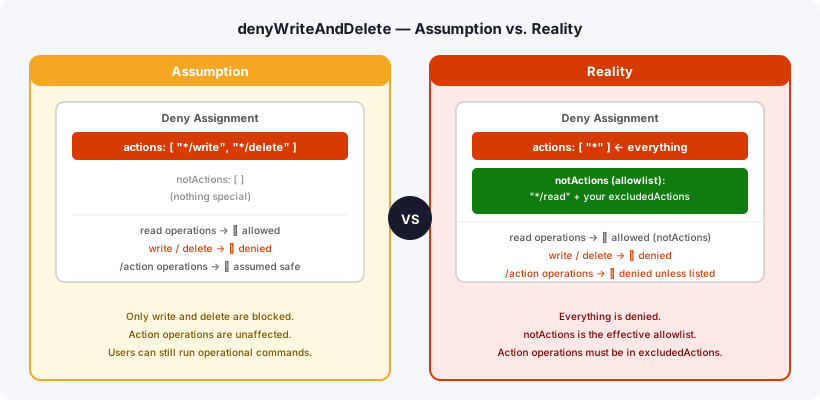
Note: Microsoft does not document the internal structure of the deny assignment. The JSON below reflects what you actually see when you inspect it directly with
az rest— treat that inspection command as your verification step, not the documentation.
{
  "actions": ["*"],
  "notActions": [
    "*/read",
    "...your excludedActions..."
  ]
}
The deny assignment denies everything — including /action operations — and uses notActions as an allowlist. Only */read and whatever you explicitly listed in excludedActions pass through.
This means operations like listClusterUserCredential/action or Microsoft.KeyVault/vaults/purge/action are silently blocked unless you add them by name.
How to inspect your deny assignments
After deploying a stack with denyWriteAndDelete, inspect the resulting deny assignment directly. This is the source of truth — not the documentation:
az rest \
  --method GET \
  --url "https://management.azure.com/subscriptions/<sub-id>/providers/Microsoft.Authorization/denyAssignments?api-version=2022-04-01" \
  --query "value[].{displayName:properties.displayName,actions:properties.permissions[0].actions,notActions:properties.permissions[0].notActions}" \
  -o json
Look for deny assignments where "actions": ["*"]. The notActions array is your effective allowlist — if an operation is not listed there, it is denied.
Run this after every stack deployment to verify exactly what is and is not allowed.
The excludedActions field is your allowlist
Your excludedActions in the deployment stack parameters maps directly to notActions on the deny assignment. The mental model is: everything is blocked except */read and whatever you list here.
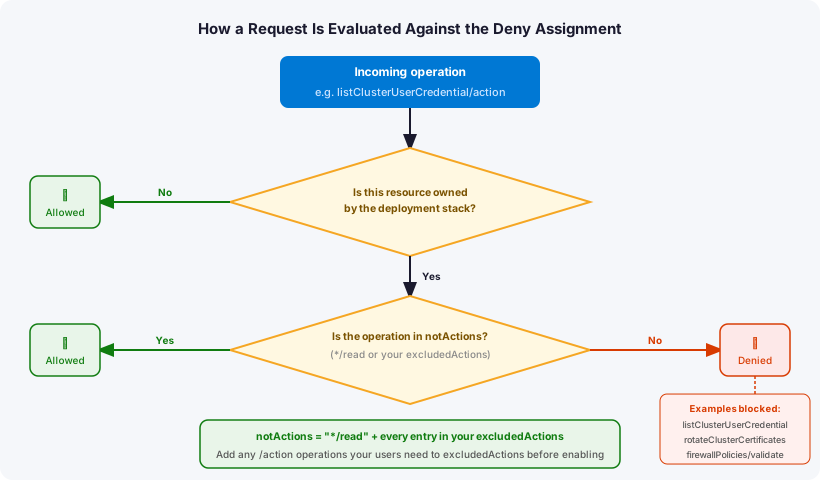
Three implications:
/actionoperations must be explicitly listed if users or Azure platform services need them.- Wildcards work —
Microsoft.Insights/diagnosticSettings/*covers both write and delete in one entry. Note that a wildcard also exempts any/actionoperations under that namespace, so use it only where the broader scope is acceptable. excludedPrincipalsis separate — operations performed only by your deployment service principal don’t need to be inexcludedActions. UseexcludedPrincipalsfor that instead. Note thatexcludedPrincipalsis capped at five principals; consolidate into Entra groups if you need to exclude more identities.
Note:
excludedActions(mapped toDenySettingsExcludedActionin PowerShell /deny-settings-excluded-actionsin CLI) is capped at 200 entries. Keep this in mind when building the list for environments with many resource types.
A methodology for finding what to exclude
Before enabling denyWriteAndDelete on a module, analyze activity logs to find operations that real users and Azure platform services actually perform on stack-managed resources.
Step 1 — KQL query against your management Log Analytics workspace
Run this over a 90-day window across the relevant subscriptions:
AzureActivity
| where TimeGenerated > ago(90d)
| where SubscriptionId in ("<your-subscription-ids>")
| where ActivityStatusValue in ("Success", "Failure")
| where OperationNameValue endswith "/write"
    or OperationNameValue endswith "/delete"
    or OperationNameValue endswith "/action"
| where Caller !in ("<your-deployment-sp-object-id>")
| summarize
    Count = count(),
    DaysActive = dcount(bin(TimeGenerated, 1d)),
    Callers = make_set(Caller, 10)
    by OperationNameValue, ActivityStatusValue
| order by Count desc
The Callers column will surface object IDs of both human users and Azure platform service principals. For any SP you do not recognize, look it up in Entra ID.
Step 2 — Identify Azure platform principals
Some operations in your activity logs come from Azure platform service principals, not your users. You can add them to excludedPrincipals, but it requires code logic to look up the service principal’s object ID in each tenant at deployment time — since object IDs differ per tenant, you cannot hardcode them portably. The simpler approach is to cover the operations they perform via excludedActions or a wildcard instead.
Common platform principals I have encountered:
| Identity | What it does |
|---|---|
| NFV Resource Provider | Regular writes to Azure Firewall resources for platform health management |
| Azure Traffic Manager | DNS A record registration for private endpoints; firewall policy validation |
| Azure Traffic Manager | Firewall policy validate actions |
Note: object IDs vary per tenant. Always look up the display name in your own Entra ID to confirm identity.
Step 3 — Cross-reference with stack-managed resource types
The deny assignment only applies to resources owned by the stack. Resources created by other resource providers — for example AKS node resource group VMs and scale sets — are not stack-managed and are not affected. Filter your activity log results to operations on resource types that appear in your Bicep templates.
Step 4 — Find /action operations through actual role assignments
Rather than enumerating every possible action in a resource provider manifest, a more targeted approach is to look at which roles are actually assigned on the subscription, and then inspect what /action permissions those roles grant.
First, pull all unique role definition IDs assigned on the subscription:
$subscriptionId = "<your-subscription-id>"

$roleAssignments = Get-AzRoleAssignment -Scope "/subscriptions/$subscriptionId"

$roleDefinitionIds = $roleAssignments.RoleDefinitionId | Sort-Object -Unique
$roleDefinitionIds
Then, for each role definition ID returned, look it up on AzAdvertizer. AzAdvertizer gives you a clear breakdown of all actions, notActions, dataActions, and notDataActions for every built-in Azure role — including every /action operation the role permits.
Work through each role assigned in your environment and note any /action entries. Those are the candidates that will be blocked by denyWriteAndDelete and may need to be added to excludedActions.
HINT
AzAdvertizer also lets you search by operation name if you already know a specific action you are trying to validate.
Any /action operation that a user with an assigned role can perform will be blocked by the deny assignment unless explicitly excluded.
Caveat: not all activity log operations are valid excludedActions
Some operations appear in activity logs but are not registered in the provider manifest. Attempting to add them to excludedActions results in:
does not match any of the actions supported by the providers
For example, Microsoft.Network/firewallPolicies/validate/action appears regularly in activity logs — Azure Traffic Manager performs health validation using it — but it cannot be referenced by that name in excludedActions. Options when you hit this:
- Add the platform service principal to
excludedPrincipalsif the object ID is consistent in your tenant - Assess whether the blocked operation causes a meaningful user impact before taking any action
Summary
| Assumption | Reality |
|---|---|
denyWriteAndDelete blocks */write and */delete | Blocks * — everything including /action |
excludedActions supplements the deny | excludedActions is the allowlist (plus */read) |
/action operations are safe | Must be explicitly excluded if users need them |
| One-time analysis of write/delete ops is enough | Also need to review /action permissions on all roles assigned in your environment |
Final remark
Inspect the deny assignment directly after every stack deployment using the az rest command shown above. The notActions array is the actual source of truth for what is allowed. Do not rely on the excludedActions you wrote — verify that the platform rendered it correctly before users hit the restriction in production.
Have feedback on this post?
Send me a message and I'll get back to you.