Azure Deployment Stacks - When unique VNets still collide in a shared hub deployment
- Intro
- The setup: separate spoke stacks, one shared hub
- Symptoms: peering failures and conflicting deployments
- Root cause: unique resource IDs do not make nested deployment names unique
- Solution: derive the deployment name from the full spoke identity
- Prevention: validate identity at the correct scope
Intro
During an Azure Deployment Stacks implementation, I ran into an issue with VNet peerings between application landing zones and a common hub in a connectivity subscription. I wanted the stacks to delete resources that were removed from their templates. Instead, I found deployment-name collisions at the shared hub, and one stack reported deleting a peering belonging to another spoke.
The VNets were different Azure resources. However, that did not make every deployment involved in creating their peerings unique. The distinction between a resource’s short name, its full resource ID, and the name of the nested deployment turned out to be important.
In this article, I will walk through the naming issue, the deletion risk, the change I made, and the checks I would put in CI before allowing CD to run. The names and subscription labels in the drawings are illustrative, not identifiers from the environment.
The setup: separate spoke stacks, one shared hub
I used subscription-scoped deployment stacks for our application landing zones. Each spoke had its own VNet, and the networking template also deployed the hub-side peering into the connectivity subscription.
There are two peering resources in this design: one on the spoke VNet and one on the hub VNet. My spoke automation created both directions. The hub-side peering was therefore part of the spoke stack’s resource inventory, even though it lived in the shared connectivity subscription.
For the resource cleanup behavior, I used actionOnUnmanage: deleteResources. This deletes previously managed individual resources when they are no longer managed, while detaching managed resource groups rather than deleting them.
That is different from deleteAll, which also allows managed resource groups to be deleted. I covered that separate risk in A subscription-scoped stack can delete untracked resources.
HINT
The setting is called
actionOnUnmanage, not “delete on unattach.” It applies when an update stops managing a resource, and when the stack itself is deleted. It is not a general cleanup of every resource absent from your template.
Symptoms: peering failures and conflicting deployments
The investigation recorded DeploymentActive conflicts, DeploymentNotFound failures, disconnected spoke-side peerings, and missing hub-side peerings. One stack also reported deleting the peering for another spoke.
Those observations sent me in two directions: why were independent spokes trying to use the same deployment, and why did a stack’s reported deletion involve another spoke?
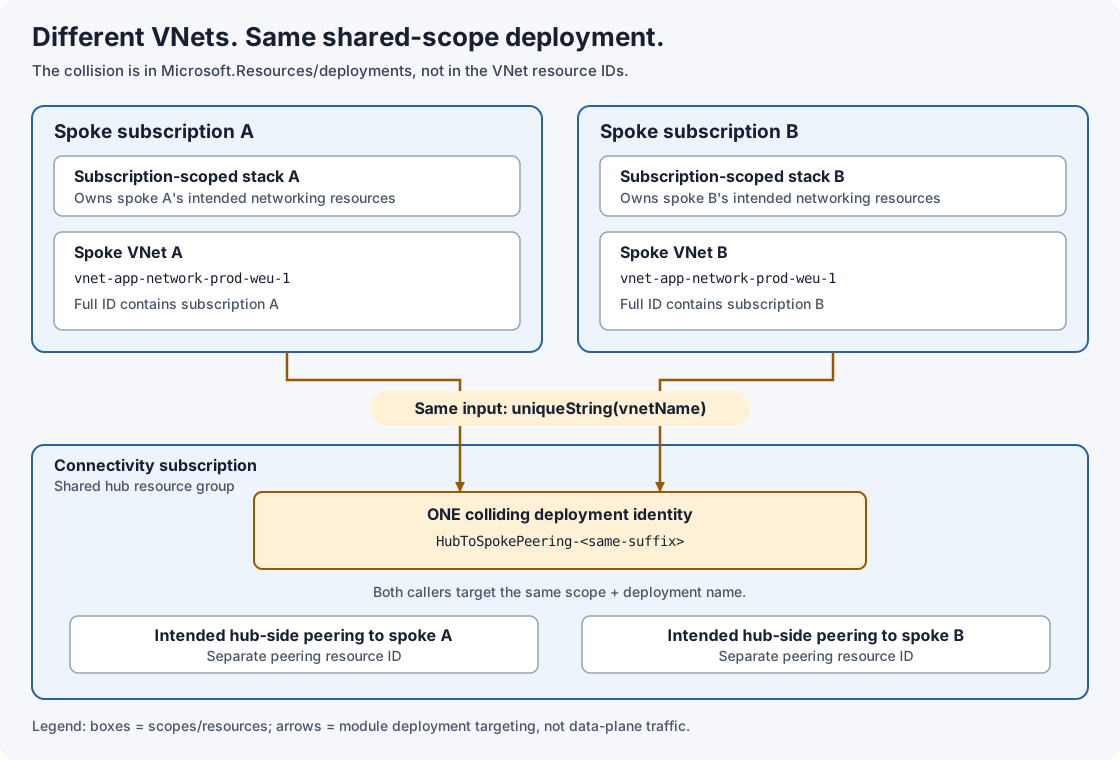
Root cause: unique resource IDs do not make nested deployment names unique
A Bicep module becomes a nested Microsoft.Resources/deployments resource in the generated ARM template. The module’s name property names that deployment; it does not name the VNet or the peering.
The hub-side deployment used this pattern:
name: 'HubToSpokePeering-${uniqueString(vnetName)}'In the affected pattern, different subscriptions could use the same short VNet name. For example, both could contain vnet-app-network-prod-weu-1. The VNets still had different full resource IDs because their subscription IDs were different.
uniqueString() is deterministic. If I pass the same short name twice, I get the same suffix twice. This was not a random hash collision: I supplied the same input for different resource identities.
The critical comparison was:
Spoke A:
/subscriptions/<spoke-a>/resourceGroups/<spoke-rg>/providers/Microsoft.Network/virtualNetworks/vnet-app-network-prod-weu-1

Spoke B:
/subscriptions/<spoke-b>/resourceGroups/<spoke-rg>/providers/Microsoft.Network/virtualNetworks/vnet-app-network-prod-weu-1
These are different VNet IDs. But both hub-side module deployments resolved to:
/subscriptions/<connectivity>/resourceGroups/<hub-rg>/providers/Microsoft.Resources/deployments/HubToSpokePeering-<same-suffix>There is no “parent spoke stack” segment in that nested deployment ID to separate them.
If the short VNet names really are different, this particular same-input defect does not explain a collision. In that case, inspect the evaluated deployment names and target scopes for another insufficient naming input, such as a fixed deployment name.
Microsoft’s Bicep modules documentation warns that concurrent modules with the same static name at the same scope can interfere with each other’s outputs. Serializing deployments can reduce an active-deployment conflict, but it does not give the deployments different identities.
Solution: derive the deployment name from the full spoke identity
I changed the naming input from the spoke VNet’s short name to its full resource ID:
// Before
name: 'HubToSpokePeering-${uniqueString(vnetName)}'

// After
name: 'HubToSpokePeering-${uniqueString(vnet.id)}'
The full ID includes the subscription, resource group, resource type, and VNet name. Same-named VNets in different subscriptions therefore supply different inputs. I preserved the existing peering resource names and configuration.
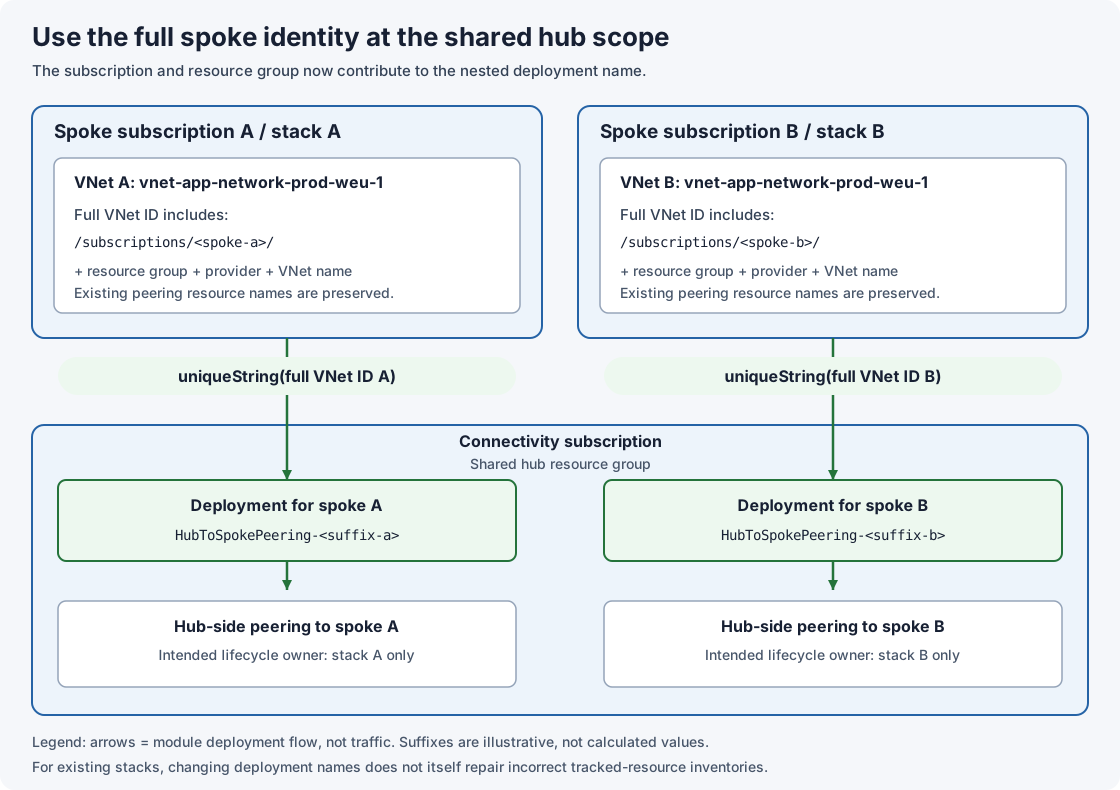
For a single hub-side module per spoke VNet, that was the focused correction. If one spoke can target several hubs in the same hub resource group, include the hub identity too. If different module roles can target the same pair, distinguish those roles as well. A short hash is not a mathematical guarantee of uniqueness; I still need collision checks.
A simplified Bicep example
Here is an independent, minimal example of the corrected pattern. It assumes both VNets already exist. The calling module runs in the spoke resource group; the hub peering module runs in the hub resource group.
main.bicep:
param spokeVnetName string
param hubSubscriptionId string
param hubResourceGroupName string
param hubVnetName string
param hubPeeringName string

resource spokeVnet 'Microsoft.Network/virtualNetworks@2022-05-01' existing = {
  name: spokeVnetName
}

module hubPeering './hub-peering.bicep' = {
  name: 'HubToSpokePeering-${uniqueString(spokeVnet.id)}'
  scope: resourceGroup(hubSubscriptionId, hubResourceGroupName)
  params: {
    hubVnetName: hubVnetName
    spokeVnetId: spokeVnet.id
    peeringName: hubPeeringName
  }
}hub-peering.bicep:
param hubVnetName string
param spokeVnetId string
param peeringName string

resource hubVnet 'Microsoft.Network/virtualNetworks@2022-05-01' existing = {
  name: hubVnetName
}

resource peering 'Microsoft.Network/virtualNetworks/virtualNetworkPeerings@2022-05-01' = {
  parent: hubVnet
  name: peeringName
  properties: {
    remoteVirtualNetwork: {
      id: spokeVnetId
    }
    allowVirtualNetworkAccess: true
    allowForwardedTraffic: false
    allowGatewayTransit: false
    useRemoteGateways: false
  }
}
This only illustrates the hub-to-spoke direction. Your subscription-scoped entry point must call the first module at the spoke resource-group scope. Keep the spoke-to-hub peering, routing, gateway-transit settings, permissions, and deny settings appropriate to your design. The supplied hubPeeringName must also distinguish the spoke on the hub VNet.
Prevention: validate identity at the correct scope
The answer is not to make every Azure name globally unique. Names must be unique within the scope that defines their identity, with separate ownership for independently managed resources.
| Object | Identity or uniqueness boundary to validate |
|---|---|
| Azure resource | Full resource ID, plus any provider-specific global naming rules |
| Resource group | Subscription ID and resource-group name |
| Subscription | Subscription ID; a display name is not a reliable unique key |
| Management group | Tenant context and management-group ID, not its display name or parent path |
| Nested deployment | Target scope ID and deployment name |
| Deployment stack | Stack scope ID and stack name |
| VNet peering | Parent VNet ID and peering name; verify the remote VNet ID too |
I would still use clear, distinguishable display names for operations. But a naming convention is not a substitute for checking IDs. See Microsoft’s resource naming rules and management-group ID guidance.
Which linters help?
I would combine the Bicep linter with PSRule for Azure and focused tests for our deployment topology. Neither tool should be treated as a universal cross-stack ownership checker.
For example, bicepconfig.json can make these Bicep rules blocking:
{
  "analyzers": {
    "core": {
      "enabled": true,
      "rules": {
        "no-deployments-resources": {
          "level": "error"
        },
        "use-resource-id-functions": {
          "level": "error"
        }
      }
    }
  }
}
no-deployments-resources encourages modules instead of hand-authored deployment resources. use-resource-id-functions helps avoid hand-assembled resource IDs. Neither rule detects our deployment-name defect.
There is also a relevant no-module-name rule. It flags explicit module names so Bicep can generate deterministic names using module context. It is off by default. That is an alternative worth evaluating with a pinned, supporting compiler, not a rule to enable blindly on the explicit-name example above. Changing to generated names is still an identity migration for existing stacks.
PSRule adds Azure configuration and naming checks against the inputs it evaluates. For collisions between separate landing-zone deployments, I need to bring those separate configurations into the same test.
Add a regression check for the actual module
For the simplified example, save this as tests/Test-HubPeeringIdentity.ps1 and run it from the folder containing main.bicep:
$ErrorActionPreference = 'Stop'

$compiled = bicep build ./main.bicep --stdout
if ($LASTEXITCODE -ne 0) {
    throw 'Bicep compilation failed. Fix the template before checking deployment identity.'
}

$template = ($compiled -join "`n") | ConvertFrom-Json
$deployments = @($template.resources | Where-Object {
    $_.type -eq 'Microsoft.Resources/deployments'
})

$expectedName = "[format('HubToSpokePeering-{0}', uniqueString(resourceId('Microsoft.Network/virtualNetworks', parameters('spokeVnetName'))))]"
if ($deployments.Count -ne 1 -or $deployments[0].name -cne $expectedName) {
    throw 'Expected one hub module deployment named from the full spoke VNet resource ID.'
}
This deliberately checks a specific compiled module contract. It rejects the original short-name expression, but is not a general ARM expression evaluator or a cross-estate collision detector. Adapt it when the module structure or compiler output changes; do not weaken it just to make a failing build green.
For broader prevention, build a parameterized test matrix that evaluates the actual naming logic:
| Test input | Required result |
|---|---|
| Same short VNet name, different spoke subscription IDs, same hub scope | Different hub deployment IDs |
| Same short VNet name, different spoke resource groups, same hub scope | Different hub deployment IDs |
| Different short VNet names, same hub scope | Different hub deployment IDs |
| Same inputs on a later run | Same intended deployment and resource IDs |
| Two independent owners claim the same deployment ID at the same scope | Fail before CD |
| Two stacks claim the same peering resource ID | Fail or require an explicit ownership migration |
Across all landing zones that share a hub, collect evaluated deployment scope/name pairs and intended managed-resource IDs. Compare IDs case-insensitively and group by the complete identity, recording the owning stack. Fail on unintended overlap, incomplete evaluation, or missing parameter sets. Include unchanged landing zones too: testing only the PR’s changed files can miss the other half of a collision.
Make CI a real prerequisite for CD
An Azure DevOps CI job for the two-file example can start with:
stages:
  - stage: CI
    jobs:
      - job: ValidateIdentity
        pool:
          vmImage: ubuntu-latest
        steps:
          - checkout: self
          - bash: |
              set -euo pipefail
              bicep --version
              bicep lint main.bicep
              bicep lint hub-peering.bicep
              bicep build main.bicep --outfile "$(Agent.TempDirectory)/main.json"
            displayName: Lint and compile
          - pwsh: ./tests/Test-HubPeeringIdentity.ps1
            displayName: Check hub deployment identity
This assumes an agent with the required Bicep CLI and PowerShell installed. Pin the toolchain in your agent/bootstrap configuration. Add PSRule and the cross-configuration test matrix to this stage, and make the real CD stage depend on CI with condition: succeeded(). Do not use continueOnError for these checks.
This sample CI job catches the specific regression; it does not implement the complete inventory and collision gate described above. For production, also validate and promote the same template artifact and parameter versions rather than rebuilding different inputs after approval.
Preview stack cleanup, not just template changes
Microsoft now documents deployment stack what-if, including Delete and Detach results. It is different from ordinary az deployment sub what-if.
Use the stack-specific preview against the intended stack ID, template, parameters, actionOnUnmanage, and deny settings. Require review of unexpected deletes, detaches, and incomplete or unsupported evaluations before applying the stack.
Note that stack what-if creates a stored result resource with a retention interval. It does not apply the proposed managed-resource changes, but it is not an entirely offline, read-only CI check either. Put it in an authenticated pre-deployment validation stage with the necessary permissions. Keep the offline lint and identity tests earlier in CI.
What-if is a point-in-time prediction, not a concurrency lock or proof of ownership correctness. Control competing deployments and refresh the preview if the inputs or shared environment change.
Have feedback on this post?
Send me a message and I'll get back to you.