Azure Deployment Stacks - A subscription-scoped stack can delete untracked resources
- Intro
- The scope distinction in the documentation
- What we tested
- What happened
- Why the untracked identity was deleted
- The configuration approach I chose
- Final remark
Intro
I wanted to verify what Microsoft means when the deployment stack documentation says that unmanaged resources can prevent a resource group from being deleted. It is easy to read that statement as a general safeguard for any resource group containing untracked resources.
In a controlled live test, a subscription-scoped deployment stack deleted a resource group that it managed. An independently created user-assigned managed identity inside that group was deleted with it, even though the stack did not track the identity.
The distinction is important: the stack did not directly manage or delete that identity. It deleted the containing resource group, and that deletion removed the identity too.
The scope distinction in the documentation
The Microsoft documentation on deleting deployment stacks states:
Even if you specify the delete-all switch, unmanaged resources within the resource group where the deployment stack is located prevent both the unmanaged resources and the resource group itself from being deleted.
The key phrase is “the resource group where the deployment stack is located.” A resource-group-scoped stack is located inside a resource group. A subscription-scoped stack is located at subscription scope and can manage resource groups as resources.
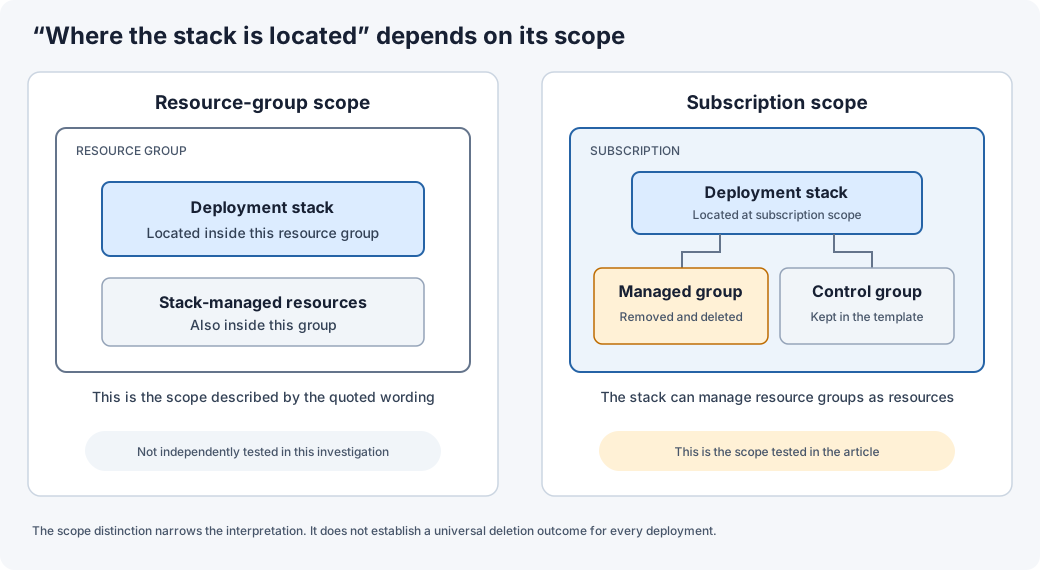
Our test involved a resource group managed by a subscription-scoped stack. It did not involve a resource group hosting a resource-group-scoped stack. I did not independently test the resource-group-scoped scenario, so I would not use our result to claim that the documentation is universally false.
What we tested
We used an isolated subscription-scoped deployment stack with actionOnUnmanage set to deleteAll and deny settings set to none.
- We deployed two resource groups, each containing a stack-managed user-assigned managed identity.
- We independently created another user-assigned managed identity in the group selected for removal.
- We verified that the additional identity existed but was absent from the stack’s managed-resource inventory.
- We updated the template to remove the target group and its stack-managed identity.
- We kept the control group and its existing identity in the template, then added a new identity there.
- We redeployed the same stack with
deleteAll.
This was a normal stack update. We did not need to delete the deployment stack itself to trigger the resource-group deletion.
What happened
The stack update completed successfully, with these results:
| Item | Result |
|---|---|
| Resource group removed from the template | Deleted |
| Stack-managed identity inside that group | Deleted |
| Independently created, untracked identity inside that group | Deleted |
| Control group and its existing identity | Preserved |
| Newly declared identity in the control group | Created |
| Pre-existing subscription resource and group IDs | Still present |
We subsequently cleaned up all temporary test resources and deployment records.
Why the untracked identity was deleted
The identity was not part of the stack’s managed-resource inventory. Its absence from that inventory did not protect it from deletion of its containing resource group.
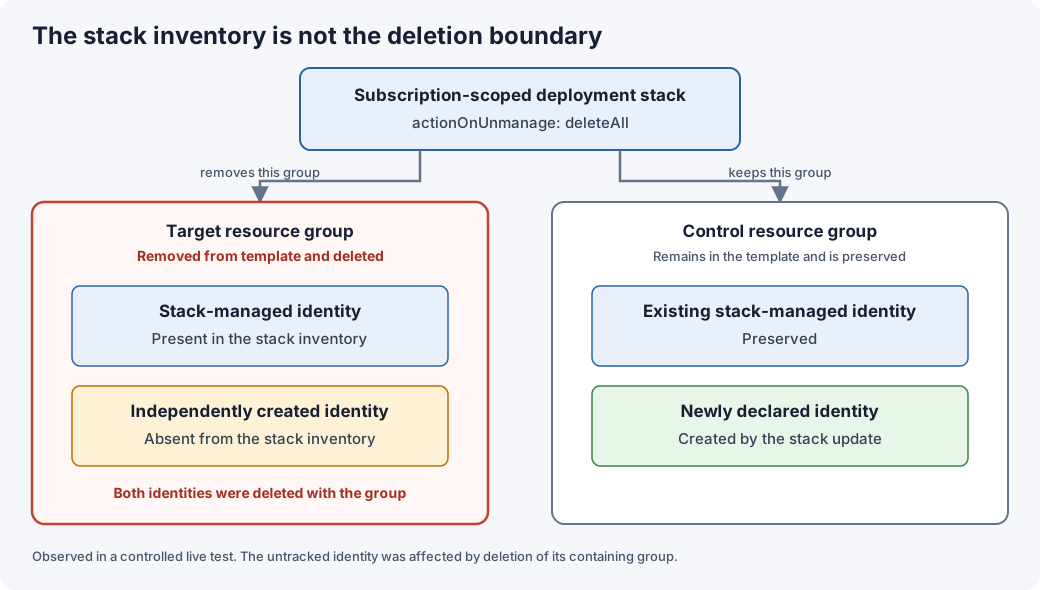
That is the boundary to keep in mind: a stack’s inventory describes the resources it manages directly. It does not describe every resource that could be affected when the stack deletes a container, such as a resource group.
In a shared resource group, platform automation might manage the group while customer or application teams deploy other resources into it. If the stack is allowed to delete that group, those independently deployed resources can be lost as a consequence.
This does not mean that deployment stacks indiscriminately delete every untracked resource. In our test, the untracked identity was deleted because its containing resource group was deleted. Locks, permissions, dependencies, and other protections can affect whether a resource group can be deleted.
The configuration approach I chose
I separated cleanup behavior for individual managed resources from cleanup behavior for managed resource groups:
| Action-on-unmanage target | Selected behavior |
|---|---|
| Previously managed individual resources | delete |
| Previously managed resource groups | detach |
The intent is to keep automatic cleanup for previously managed resources removed from the template, while avoiding deletion of their containing resource groups through the stack’s resource-group cleanup action.
Detaching a resource group does not preserve stack-managed resources that are separately selected for deletion. It also does not identify or flag orphaned resources. Preserved groups and independently deployed contents still need a separate inventory, ownership review, and cleanup process.
Final remark
Before enabling resource-group deletion in a subscription-scoped deployment stack, check what else can live inside each group. Test the exact cleanup behavior in an isolated scope, and do not assume that resources absent from the stack’s inventory will be protected when their containing group is deleted.
Have feedback on this post?
Send me a message and I'll get back to you.