Azure Local - Fix: Could not connect to net.tcp://localhost:9098/BootstrapOobeService
Intro
After doing a fresh install of an Azure Local node and attempting to join it to Azure (see Azure Local - Homelab - Part 2 - Configuration pre-requisites for the required steps), you may encounter this error:
Could not connect to net.tcp://localhost:9098/BootstrapOobeService
It is tempting to think you were simply too quick — that renaming the node and rebooting before the OS had finished its initial setup caused the issue. And while that can be a contributing factor, waiting for all the required post-install reboots to complete is unfortunately no guarantee either. The Bootstrap setup script can silently get stuck mid-run, and the node ends up in a state where it cannot be reached by the Azure Local deployment process.
In this article I will walk through how to identify that the Bootstrap setup did not complete, and how to fix it.
The Bootstrap setup script
When Azure Local nodes are freshly installed, a setup script runs automatically as part of the OS first-boot sequence. It is located here:
C:\Windows\Setup\Scripts\setupcomplete.cmd
The content of the script is:
@ECHO OFF
powershell.exe -ExecutionPolicy Unrestricted -Command "C:\startupScriptsWrapper.ps1 'C:\BootstrapPackage\bootstrap\content\Bootstrap-Setup.ps1 -Install'"
This script is responsible for installing and starting two critical services:
BootstrapRestService— handles REST communication for the bootstrap processBootstrapManagementService— manages the bootstrap setup completion and reports back to the deployment pipeline
You can check whether the script completed successfully by reviewing the transcript log. Navigate to C:\Windows\Setup\ and open the file named startupScript. This file shows the output of the last execution of the bootstrap setup.
What a failed run looks like
In the startupScript log, a stuck or failed run looks like this — note the repeated lines:
Info ManagementService has not finished setup
Info ManagementService has not finished setup
Info ManagementService has not finished setup
...
If you see this pattern repeating many times before the transcript ends without a success message, the BootstrapManagementService timed out waiting for setup to complete. The node is now in a broken state where the BootstrapOobeService endpoint on port 9098 is not reachable, which is exactly the error the deployment process reports.
Fix
The fix is straightforward: run setupcomplete.cmd again manually on the affected node.
Open an elevated command prompt and run:
C:\Windows\Setup\Scripts\setupcomplete.cmdWhen you check the startupScript log afterwards, a successful run ends with:
Info ManagementService started successfully
Info ManagementService has finished setup
Info ManagementService already running, skipping install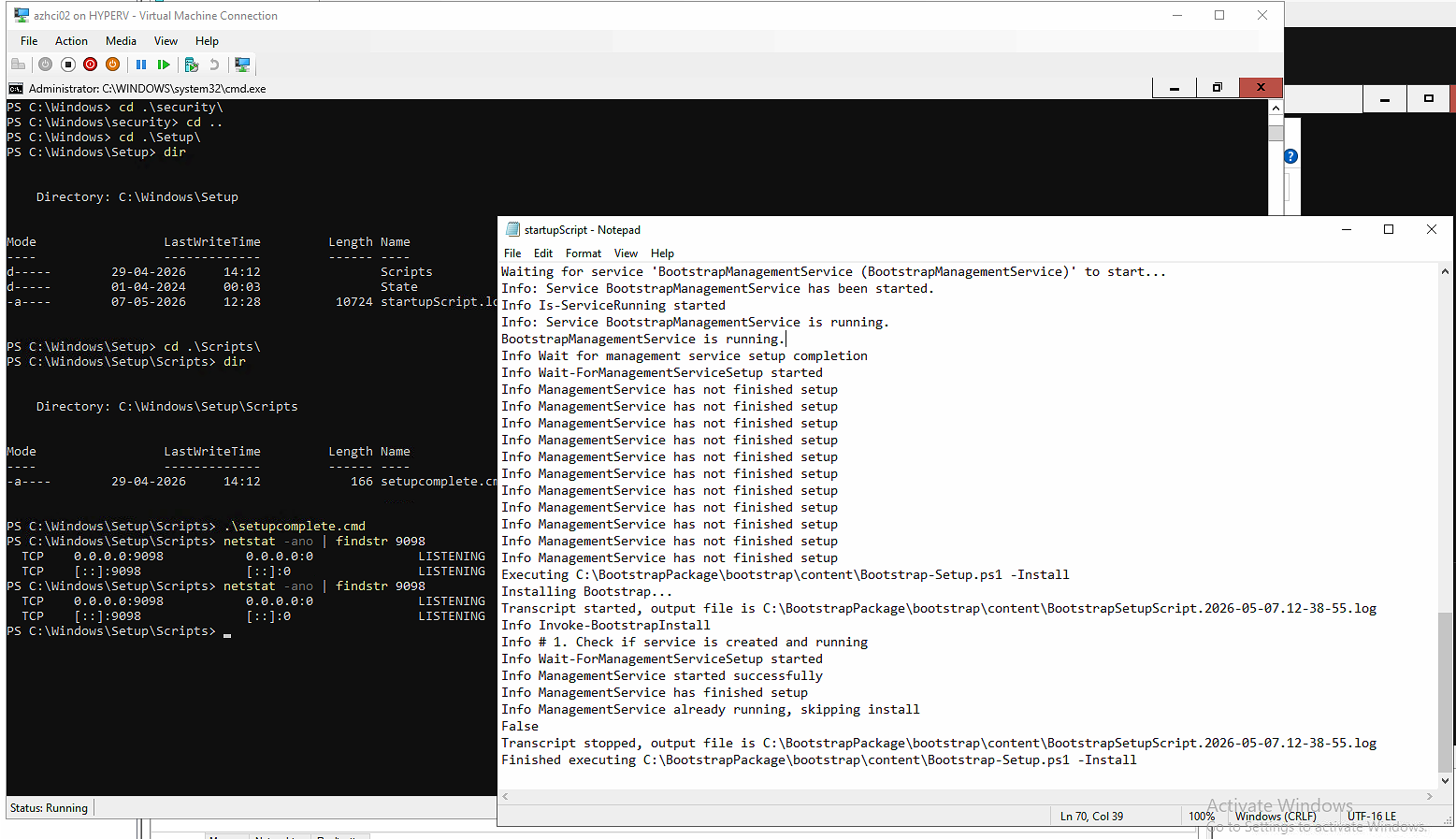
Wait a few minutes after the script completes before retrying the Azure Local deployment or node registration. The services need a moment to fully initialize before the BootstrapOobeService endpoint becomes available.
Final remark: If you are doing a fresh install, give the node time to complete its first-boot setup before renaming it and initiating the join process. But as this issue shows, even a patient approach does not always prevent the Bootstrap script from getting stuck — so if you see the BootstrapOobeService error, check the startupScript log first and re-run setupcomplete.cmd if needed.
Have feedback on this post?
Send me a message and I'll get back to you.