Azure Local - LENS - Deploy and auto-update the workbook with Azure DevOps
- Intro
- Why I built it this way
- What is in the repo
- Prerequisites
- How the Azure DevOps pipeline is set up
- What happens when the pipeline runs
- Deploying the workbook in Azure
- Running the scripts locally
- Why this is useful for Azure Local admins
Intro
This article is the automation companion to Azure Local - LENS. In that post I showed how to manually import the Azure Local LENS workbook into Azure Monitor. Here I want to show how I use my own scripts and an Azure DevOps pipeline to keep that workbook deployed and updated with much less manual work.
The target audience here is the Azure Local administrator who may not live in Azure DevOps every day. So I will keep the pipeline parts practical and explain what the scripts do, why I split the workbook when it gets too large, and how the update flow works when the upstream workbook changes.
I also want to give credit where it is due: the Azure Local LENS workbook itself is excellent work by its creators, and this post is only about how I automate delivery of that work into my own environment.
HINT
LENS is still the same workbook. The difference in this post is that I am packaging the deployment into scripts and a pipeline so I can repeat it consistently across environments.
Why I built it this way
The manual process works, but it gets old quickly when you manage more than one tenant (like MSPs do):
- I want one repeatable deployment path instead of copying JSON into the portal every time.
- I want deployment to keep working even if the upstream GitHub repo is temporarily unavailable or returns an error.
- I want the deployment to handle the Azure Monitor Workbooks payload limit without me having to think about it.
That is what this repo does. It pulls the latest upstream workbook JSON, caches it, optionally opens a PR when the cached version changes, and deploys the workbook to my own Azure subscription.
What is in the repo
The repository has two main parts:
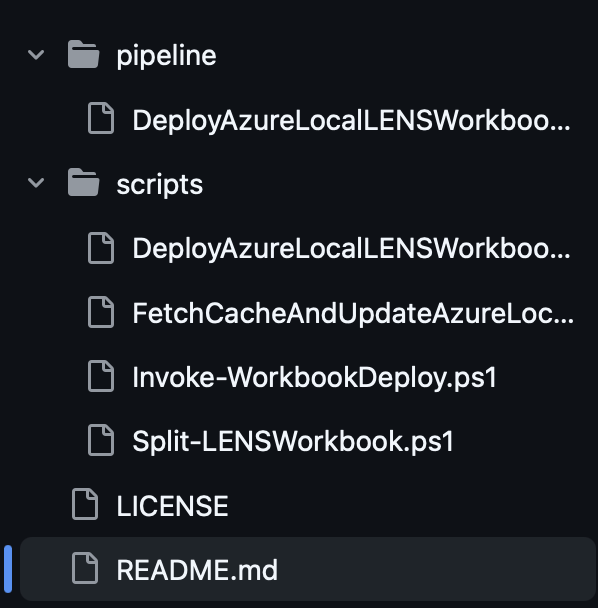

| File | Purpose |
|---|---|
scripts/DeployAzureLocalLENSWorkbook.ps1 | Entry point for validation, splitting, and deployment |
scripts/FetchCacheAndUpdateAzureLocalLENSWorkbook.ps1 | Downloads the upstream workbook and manages the cached copy |
scripts/Invoke-WorkbookDeploy.ps1 | Thin wrapper around az rest for workbook deployment |
scripts/Split-LENSWorkbook.ps1 | Splits the workbook when the payload gets too large |
pipeline/DeployAzureLocalLENSWorkbook.yml | Azure DevOps pipeline definition |
The important design choice is that the workbook is treated as code. The JSON file is cached in the repo, and the pipeline works from that cached copy.
Prerequisites
Before I run this in Azure DevOps, I need a few things in place:
- Azure CLI and PowerShell 7 if I want to test the scripts locally.
- An Azure DevOps project with a YAML pipeline.
- An Azure service connection that can deploy to the target subscription. If you need to set one up, Microsoft has a good guide here: https://learn.microsoft.com/en-us/azure/devops/pipelines/release/configure-workload-identity?view=azure-devops&tabs=managed-identity
- Permission to create or update workbook resources in the target resource group.
Allow scripts to access the OAuth tokenenabled if I want the pipeline to create pull requests for cache updates.
HINT
The service connection name must match the target
subscriptionId. That keeps the pipeline simple and avoids extra mapping logic. If your environment uses a different naming pattern, adjust the pipeline to point at the correct service connection name.
How the Azure DevOps pipeline is set up
The pipeline is defined in pipeline/DeployAzureLocalLENSWorkbook.yml, and it runs on a daily schedule to check for upstream changes. I can still run it manually when I want to, but the schedule gives me a regular update check without any extra work.
In Azure DevOps I import the YAML, point it at the repo, and then run it with runtime inputs. For admins who do not use Azure DevOps every day, runtime inputs are just the values you fill in when you click Run pipeline.
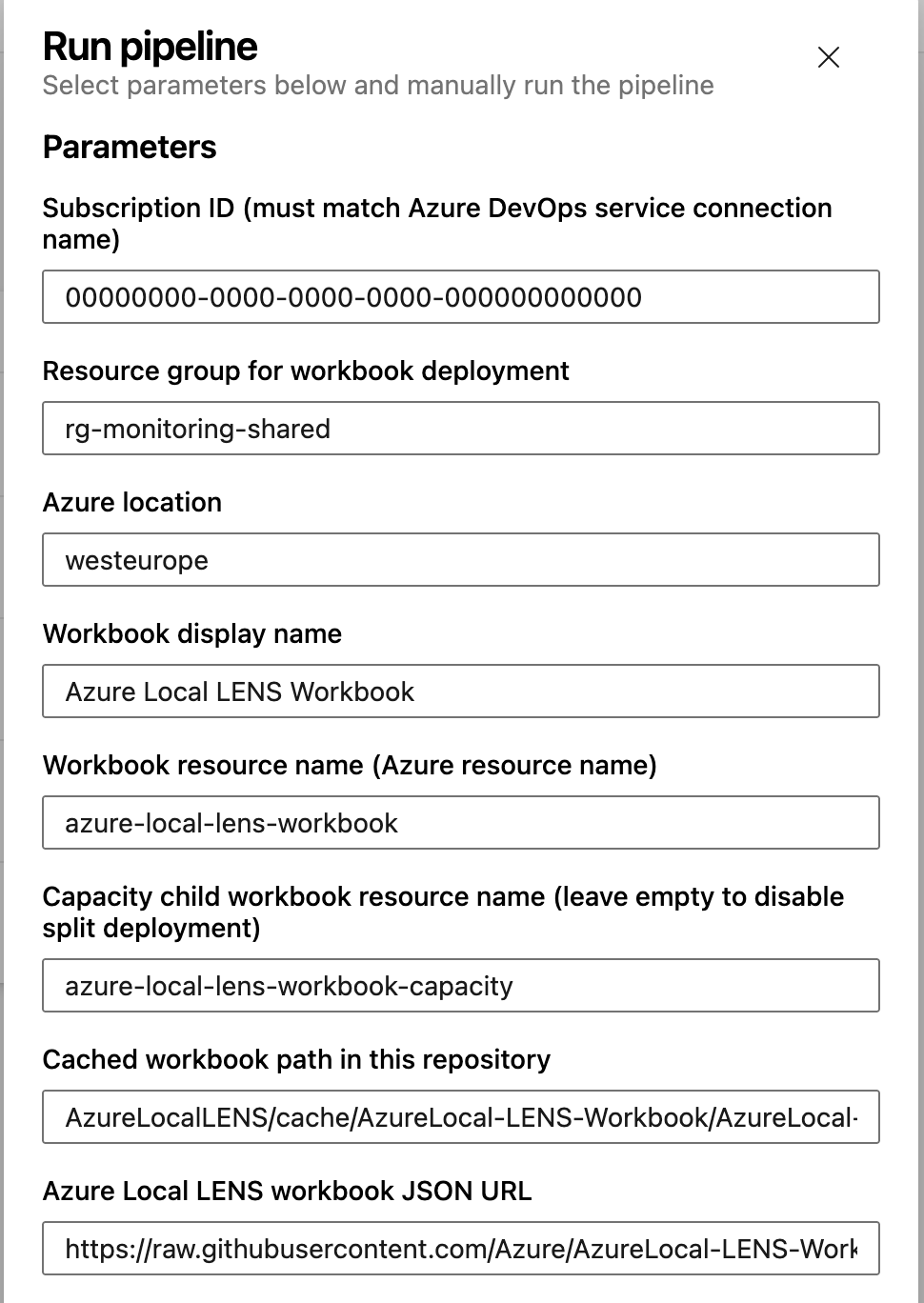
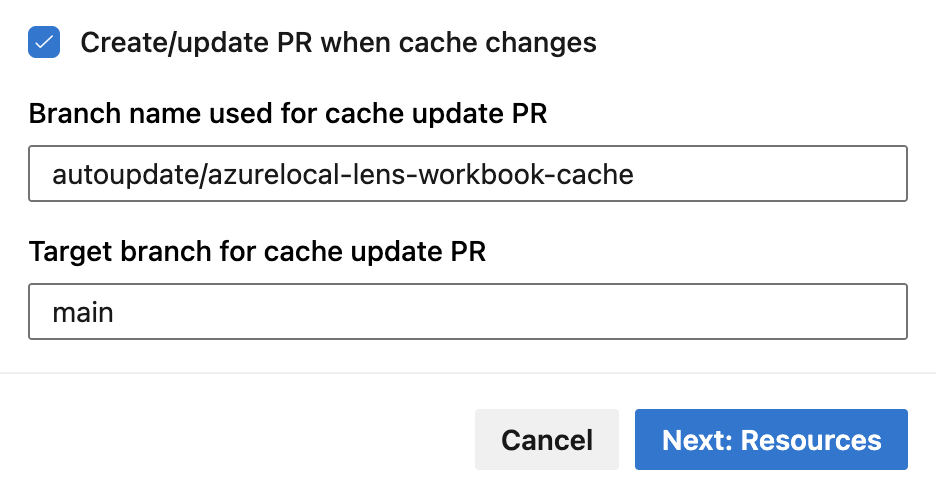
The key inputs are:
| Input | What I use it for |
|---|---|
subscriptionId | Target subscription for the workbook deployment |
resourceGroupName | Resource group where the workbook is created |
location | Azure region for the workbook resource |
workbookDisplayName | Friendly name shown in the portal |
workbookResourceName | Deterministic workbook resource name |
capacityWorkbookResourceName | Optional child workbook for capacity views |
cachePath | Repo path to the cached workbook JSON |
githubWorkbookUrl | Upstream raw JSON URL |
createCacheUpdatePullRequest | Whether the pipeline opens a PR when the cache changes |
What happens when the pipeline runs
When I start the pipeline, Azure DevOps creates a job that checks out the repo and runs the PowerShell scripts.
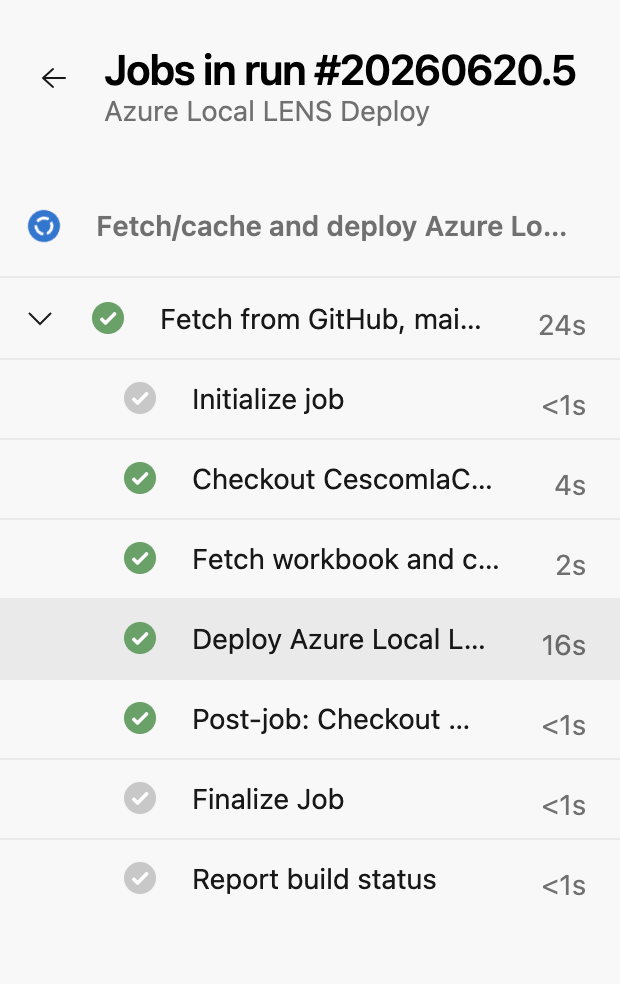
The job first fetches the upstream workbook JSON and compares it with the cached version in the repo. If the upstream workbook has changed, the pipeline updates the cache and can open a pull request so I can review the change before it reaches my repository.
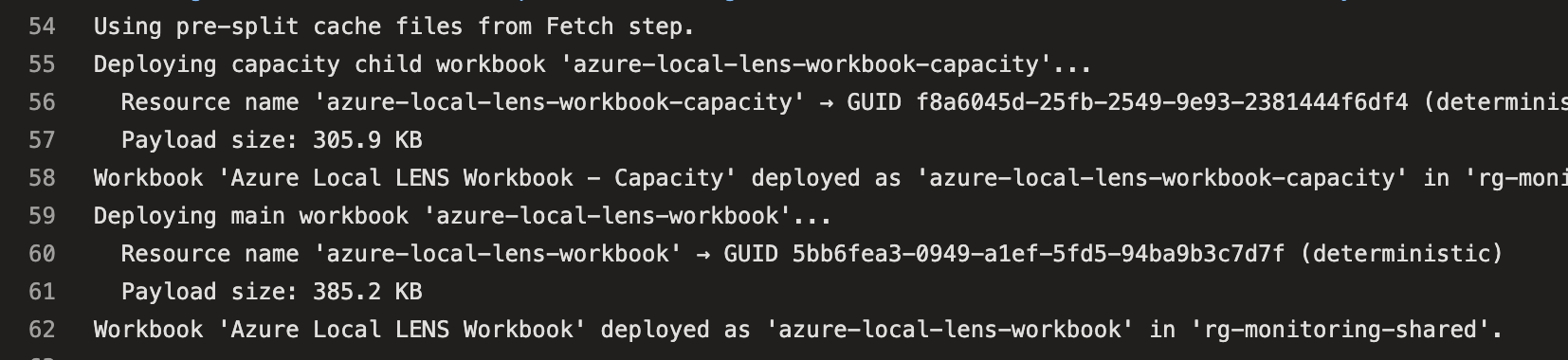
After that, the deployment script checks the workbook size. Azure Monitor Workbooks has a hard payload limit of about 600 KB, so the scripts use a conservative split threshold of 500 KB.
If the workbook is too large, the split logic does two things:
- Extracts the
capacity-tab-groupinto a standalone capacity child workbook. - Rewrites the Capacity tab in the main workbook so it opens the child workbook through a
WorkbookTemplatelink.
The capacity child workbook is deployed first, followed by the main workbook. If the workbook stays under the limit, the pipeline deploys it as a single resource.
Deploying the workbook in Azure
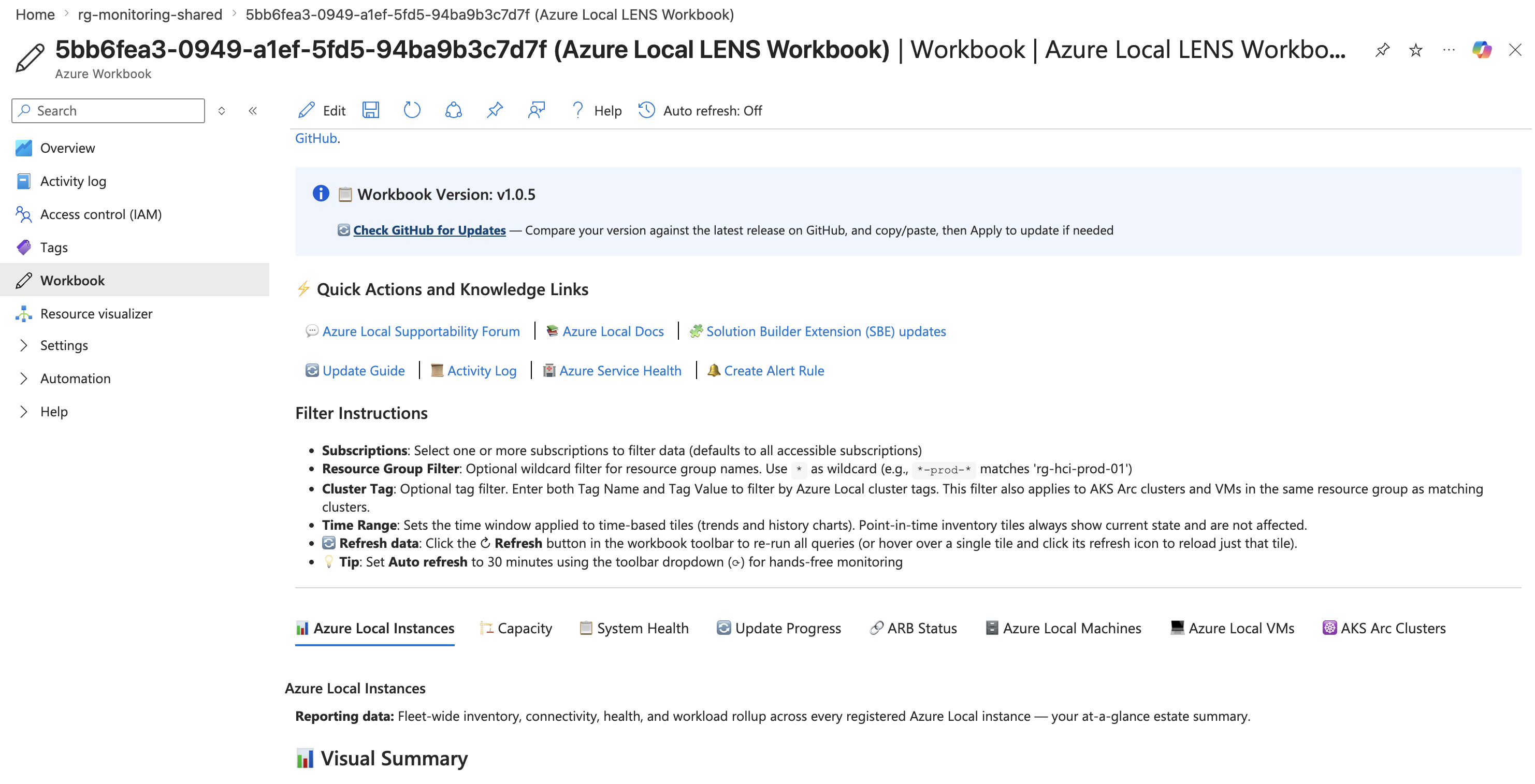
Once the job finishes, I can see the deployed workbook resources in Azure.

The main workbook is what I use day to day in Azure Monitor.
That gives me the same LENS experience I described in the manual deployment article, but now I can repeat the deployment, review upstream changes, and keep the workbook current with far less effort.
Running the scripts locally
I still like being able to test the scripts outside Azure DevOps. The repo supports that as well.
Fetch and update the cache
Set-Location scripts

pwsh -File .\FetchCacheAndUpdateAzureLocalLENSWorkbook.ps1 `
  -CachePath "cache/AzureLocal-LENS-Workbook/AzureLocal-LENS-Workbook.json" `
  -GitHubWorkbookUrl "https://raw.githubusercontent.com/Azure/AzureLocal-LENS-Workbook/main/AzureLocal-LENS-Workbook.json" `
  -CreateCacheUpdatePullRequest $false `
  -CacheUpdateBranch "autoupdate/azurelocal-lens-workbook-cache" `
  -CacheUpdateTargetBranch "main"
Deploy the workbook
az login
az account set --subscription "00000000-0000-0000-0000-000000000000"

Set-Location scripts

pwsh -File .\DeployAzureLocalLENSWorkbook.ps1 `
  -SubscriptionId "00000000-0000-0000-0000-000000000000" `
  -ResourceGroupName "rg-monitoring-shared" `
  -Location "westeurope" `
  -WorkbookDisplayName "Azure Local LENS Workbook" `
  -WorkbookResourceName "azure-local-lens-workbook" `
  -WorkbookJsonPath "cache/AzureLocal-LENS-Workbook/AzureLocal-LENS-Workbook.json" `
  -CapacityWorkbookResourceName "azure-local-lens-workbook-capacity"
Why this is useful for Azure Local admins
If you already manage Azure Local, you probably do not want to update things manually. Using Azure DevOps as the control plane for deployment and updates gives me:
- A workbook that stays current when the upstream project changes,
- A deployment path I can repeat across subscriptions and tenants
- Reviewable update flow instead of ad hoc portal edits.
That makes it much easier to standardize LENS deployment across tenants.
If you want to try it out, the scripts and pipeline definition are available at github.com/chkja/azureLocalLENSPipelineDeploy. Feel free to adapt them to fit your own naming conventions and environments — and if you run into issues or have improvements, pull requests are welcome.
Have feedback on this post?
Send me a message and I'll get back to you.