Azure Local - Check security baseline drift on your nodes with PowerShell
- Intro
- What the portal and the built-in cmdlets show
- How the script works
- Prerequisites
- Usage
- Confirm the state with Get-AzsSecurity
- Final remark
- The scripts
Intro
Azure Local applies a security baseline to the host OS and protects it with OSConfig drift control. The question I wanted answered was simple: is the baseline actually applied and enforced on every node, and which settings differ from it? The Azure portal does not show that in enough detail.
I ended up writing a PowerShell function, Test-AzsSecurityBaselineDrift, that reads the published baseline and checks each node against it.
What the portal and the built-in cmdlets show
There are a few things that look like the answer but only cover part of it:
Get-AzsSecurity(moduleAzureStackOSConfigAgent) only covers eight feature toggles. The valid-FeatureNamevalues areDriftControl,VBS,CredentialGuard,DRTM,HVCI,SideChannelMitigation,SMBSigningandSMBClusterEncryption.- The secured-core view in the portal only shows the secured-core subset (HVCI, Boot DMA protection, System Guard, Secure Boot, virtualization-based security and TPM 2.0). On my test cluster it shows Unknown for every one of them and asks me to apply the Microsoft Cloud Security Benchmark initiative. Learn lists applying that initiative as the way to view the security defaults in the portal.
- The Azure Policy built-in “Windows machines should meet requirements of the Azure compute security baseline” (machine configuration) overlaps only partly. Its 96
AZ-WIN-*rule IDs match 74 of the 429 domain-joined baseline rules (about 17%).
According to Security features for Azure Local, Azure Local ships with more than 300 security settings enabled by default. With drift control applied, the settings are refreshed every 90 minutes to remediate changes from the desired state, and you can disable drift control during deployment. This matters for a script like mine: if drift control is on, a manual change will be reverted on its own, so a finding is more likely to be an applied-differently setting or a script problem than a recent manual change.
The actual baseline is published as CSV files in the Azure-Samples/AzureLocal repository, folder security. The files are named:
SecurityBaseline_<version>Adless.csvfor AD-less clustersSecurityBaseline_<version>domjoin.csvfor domain-joined clusters
How the script works
The function does the following:
- Detects whether the cluster is domain joined using
Win32_ComputerSystem.PartOfDomainon the first node. - Downloads the matching baseline CSV, or uses the file you pass with
-CsvPath. - Evaluates the rules on each node over PowerShell remoting (
Invoke-Command).
Remember to check if there is a newer version in GitHub and edit the function to use latest version.
Anything the script cannot evaluate is reported as Manual with the reason in the Actual column, rather than guessed.
Prerequisites
- A machine that can reach all cluster nodes over PowerShell remoting. If you have not set that up on an AD-less cluster, see Azure Local Homelab part 6 - Enable PowerShell remoting over HTTPS. Note that the script calls
Invoke-Command -ComputerNamewithout-UseSSL, so adjust it if your remoting setup requires HTTPS. - Access to
raw.githubusercontent.com, or a local copy of the CSV passed with-CsvPath. Get-ClusterNodeavailable, or pass-ComputerNameexplicitly.- An English OS language. Audit policy matching uses English subcategory names.
Usage
Save the function from the last section of this article as Test-AzsSecurityBaselineDrift.ps1 and dot-source it:
. .\Test-AzsSecurityBaselineDrift.ps1

# Summary: one row per node
Test-AzsSecurityBaselineDrift | Format-Table -AutoSize

# Details of non-compliant and manual rules
Test-AzsSecurityBaselineDrift -Detailed

# Only critical findings
Test-AzsSecurityBaselineDrift -Severity Critical | Format-Table -AutoSize

# Include compliant rules and export
Test-AzsSecurityBaselineDrift -IncludeCompliant | Export-Csv drift.csv -NoTypeInformation

# Use another baseline version, or a local CSV
Test-AzsSecurityBaselineDrift -BaselineVersion 2604
Test-AzsSecurityBaselineDrift -CsvPath .\SecurityBaseline_2610Adless.csv
The parameters are -ComputerName (default: all cluster nodes), -BaselineVersion (default 2610), -CsvPath, -Detailed, -Severity, -IncludeCompliant, -Credential, and -Verbose to show the domain detection and the download.

This is the summary from my AD-less test cluster, using SecurityBaseline_2610Adless.csv (403 rules). Both nodes report 354 compliant, 44 non-compliant (25 of them Critical) and 5 manual.
With -Detailed, you get one object per finding. Here are three non-compliant rules from the first node:
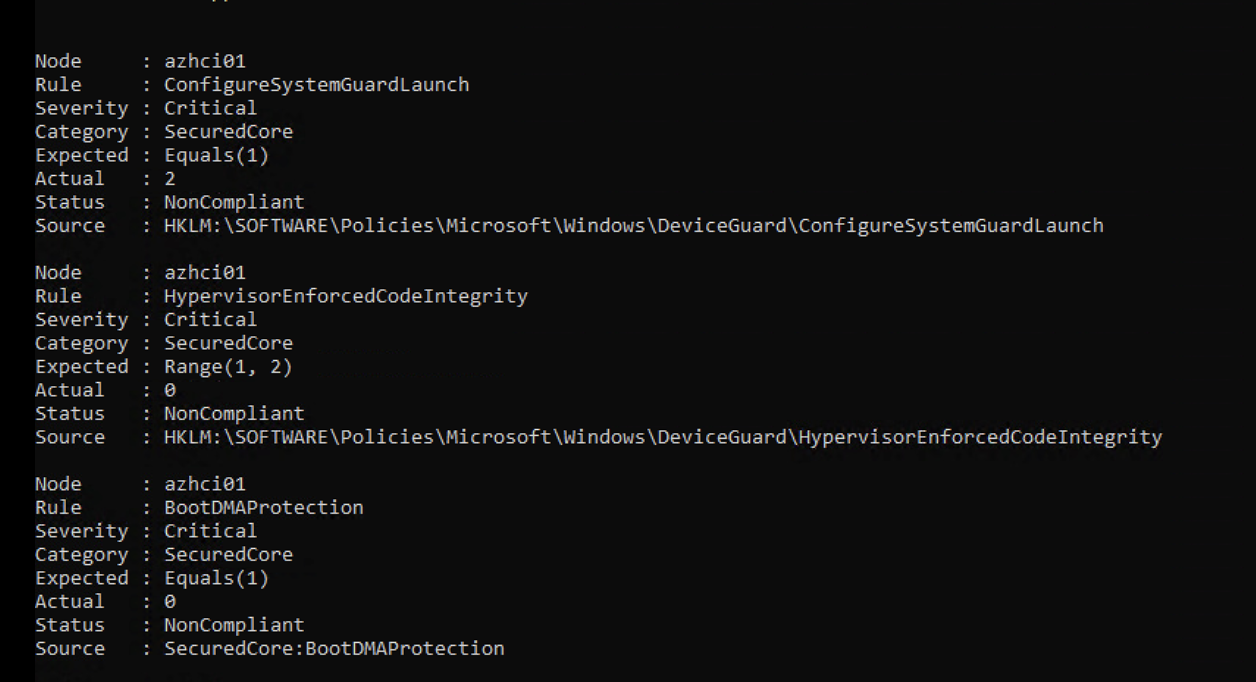
Each finding shows the expected expression from the CSV, the value the script read (Actual), and where it read it from (Source). In this sample:
ConfigureSystemGuardLaunchexpectsEquals(1)but the registry value is2.HypervisorEnforcedCodeIntegrityexpectsRange(1, 2)but the registry value is0.BootDMAProtectionexpectsEquals(1)but the script derived0. This value comes from my own mapping ofWin32_DeviceGuard(see the caveats).
These are findings to investigate, not confirmed drift.
The Severity value comes straight from the CSV. About 57% of the rules are Critical (228 of 429 for domain joined), so use it to prioritize your review, not as a risk score.
Confirm the state with Get-AzsSecurity
The CSV check tells you which baseline rules differ, but not why. A second, much simpler check is to ask the cluster which security features are switched on. The Learn article on security defaults describes how this works:
- Drift control and the other security settings (Credential Guard, Application Control, BitLocker, SMB signing, SMB encryption) are configured during deployment.
- After deployment,
Get-AzsSecurity,Enable-AzsSecurityandDisable-AzsSecurityfrom theAzureStackOSConfigAgentmodule manage the feature toggles listed earlier, and drift control with-FeatureName DriftControl. - Learn notes that the cmdlets are only available on new deployments, or on upgraded deployments after the baselines are applied to the nodes. See Manage security after upgrading Azure Local.
To check whether the toggles are on, use the syntax from Learn:
# Local node (default)
Get-AzsSecurity -FeatureName DriftControl

# Value from the orchestrator for the whole cluster (needs CredSSP or an RDP session)
Get-AzsSecurity -FeatureName DriftControl -Cluster
To do this for every node and every -FeatureName value in one go, I wrote a second small script, Test-AzsSecurityBaseline.ps1 (the full script is at the end of this post). It runs Get-AzsSecurity -FeatureName <name> -Local on each node over remoting, and also checks that the three baseline document cmdlets Get-ASOSConfigSecuredCoreDoc, Get-ASOSConfigSecuritySettingsDoc and Get-AzSOSConfigDefenderAVDoc return something.
.\Test-AzsSecurityBaseline.ps1 | Format-Table -AutoSize
.\Test-AzsSecurityBaseline.ps1 -Matrix | Format-Table -AutoSize
.\Test-AzsSecurityBaseline.ps1 | Where-Object Status -ne 'OK'
This is the output from my preview cluster:
Node    Check                             Value   Status
----    -----                             -----   ------
azhci01 DriftControl                      True    OK
azhci01 VBS                               True    OK
azhci01 CredentialGuard                   True    OK
azhci01 DRTM                              False   NotEnabled
azhci01 HVCI                              False   NotEnabled
azhci01 SideChannelMitigation             True    OK
azhci01 SMBSigning                        True    OK
azhci01 SMBClusterEncryption              False   NotEnabled
azhci01 Get-ASOSConfigSecuredCoreDoc      Present OK
azhci01 Get-ASOSConfigSecuritySettingsDoc Present OK
azhci01 Get-AzSOSConfigDefenderAVDoc      Present OK
azhci02 (identical to azhci01)
SMBClusterEncryption is a cluster-wide setting, so I also checked it with Get-AzsSecurity -FeatureName SMBClusterEncryption -Cluster, which reads the value from the orchestrator. It returned False, the same as -Local on both nodes. I have only compared the two scopes while the feature is off, so I have not shown that -Local follows the setting once it is enabled.
Enable a security feature with PowerShell
The Microsoft Cloud Security Benchmark (MCSB) initiative only monitors settings on Azure Local nodes. Applying it makes the security defaults visible in the portal, but it does not change any setting on the nodes. To switch a feature on, use Enable-AzsSecurity from the AzureStackOSConfigAgent module, with the -FeatureName values from the table in the Learn article.
# Check the current value first
Get-AzsSecurity -FeatureName HVCI -Cluster

# Enable on all nodes through the orchestrator
Enable-AzsSecurity -FeatureName HVCI -Cluster

# Or enable on the local node only (default scope)
Enable-AzsSecurity -FeatureName HVCI -Local

# Verify on every node afterwards
.\Test-AzsSecurityBaseline.ps1 | Where-Object Check -eq 'HVCI'
Per Learn:
-Localaffects the local node only and is the default.-Clusteraffects all nodes through the orchestrator.HVCI,DRTM,VBS,CredentialGuardandSideChannelMitigationrequire a reboot to take effect.SMBSigningandSMBClusterEncryptiondo not, but existing SMB sessions keep their old settings until they reconnect.Get-AzsSecurity -PerNode,-AllNodesand-Clusterrequire CredSSP or an RDP session.- The features that support drift control are kept in place once enabled. If you disable drift control you can change the protected settings, and re-enabling drift control overwrites those changes.
For the portal compliance report, Learn says it is generated after you enroll the cluster with Microsoft Defender for Cloud or assign the built-in policy Windows machines should meet requirements of the Azure compute security baseline, and that a host meeting the Secured-core hardware requirements should be about 99% compliant. Learn lists minimum password length as a rule that is by design not drift controlled, because it should follow your own policy (default 7, flagged below 14). Some of my findings may therefore be expected, which I have not checked against the CSV.
Final remark
Sources:
- Baseline CSVs: Azure-Samples/AzureLocal, folder security
- Microsoft Learn: Security features for Azure Local
- Microsoft Learn: Manage security defaults on Azure Local
The scripts
Test-AzsSecurityBaselineDrift
function Test-AzsSecurityBaselineDrift {
    <#
    .SYNOPSIS
    Detects drift from the Azure Local security baseline on every cluster node.

    .DESCRIPTION
    Detects whether the cluster is domain joined, downloads the matching baseline CSV from
    https://github.com/Azure-Samples/AzureLocal/tree/main/security (or uses -CsvPath), and evaluates the
    rules on each node:

      Registry     registry rules (Get-ItemProperty)
      Audit        audit policy rules (auditpol)
      SecEdit      local security policy, user rights and password policy (secedit /export)
      Lockout      account lockout policy (secedit /export)
      Guest        guest account state (Get-LocalUser)
      SecuredCore  Secured-core state (Win32_DeviceGuard, Confirm-SecureBootUEFI, Win32_Tpm)

    By default the function returns one summary object per node with the number of compliant, non-compliant
    and manual rules. Use -Detailed to list the individual rules.

    Rules that cannot be evaluated are reported as 'Manual' with the reason in the Actual column.

    .PARAMETER ComputerName
    Optional node names. Defaults to all nodes returned by Get-ClusterNode.

    .PARAMETER BaselineVersion
    Baseline release, for example 2610. Resolves to SecurityBaseline_<version>domjoin.csv or ...Adless.csv.

    .PARAMETER CsvPath
    Optional local CSV path. Overrides the download and the domain detection for file selection.

    .PARAMETER Detailed
    Returns one row per NonCompliant or Manual rule and node instead of the per-node summary.

    .PARAMETER Severity
    Limits the detailed output to rules with these severities (Critical, Important, Warning, Informational).
    Implies -Detailed.

    .PARAMETER IncludeCompliant
    With the detailed output, also returns the compliant rules. Implies -Detailed.

    .PARAMETER Credential
    Optional credential for remoting to the nodes.

    .EXAMPLE
    Test-AzsSecurityBaselineDrift | Format-Table -AutoSize

    .EXAMPLE
    Test-AzsSecurityBaselineDrift -Detailed | Where-Object Status -eq 'NonCompliant' | Sort-Object Severity, Node

    .EXAMPLE
    Test-AzsSecurityBaselineDrift -Severity Critical | Format-Table -AutoSize

    .EXAMPLE
    Test-AzsSecurityBaselineDrift -ComputerName node1, node2 -Detailed -IncludeCompliant | Export-Csv drift.csv -NoTypeInformation
    #>
    [CmdletBinding()]
    param(
        [string[]]$ComputerName,
        [string]$BaselineVersion = '2610',
        [string]$CsvPath,
        [switch]$Detailed,
        [ValidateSet('Critical', 'Important', 'Warning', 'Informational')]
        [string[]]$Severity,
        [switch]$IncludeCompliant,
        [pscredential]$Credential
    )

    function Get-RuleKind {
        param($Rule)

        # Rules that are validated with 'net accounts' in the CSV, read from secedit instead (locale independent)
        $secEditByName = @{
            DeviceLockMaximumPasswordAge = 'MaximumPasswordAge'
            DeviceLockMinimumPasswordAge = 'MinimumPasswordAge'
            DeviceLockMinimumPasswordLength = 'MinimumPasswordLength'
            DeviceLockPasswordHistorySize = 'PasswordHistorySize'
            ForceLogoffWhenHoursExpire = 'ForceLogoffWhenHourExpire'
        }

        if ($Rule.'Registry Key') { return @{ Kind = 'Registry'; Target = '' } }
        if ($Rule.Category -eq 'SecuredCore') { return @{ Kind = 'SecuredCore'; Target = $Rule.Name } }
        if ($Rule.Category -eq 'Audit Policy' -and $Rule.Validation -match "auditpol\s*/get\s*/subcategory:\s*'([^']+)'") {
            return @{ Kind = 'Audit'; Target = $Matches[1] }
        }
        if ($Rule.Name -eq 'DeviceLockAccountLockoutPolicy') { return @{ Kind = 'Lockout'; Target = '' } }
        if ($Rule.Name -eq 'EnableGuestAccountStatus') { return @{ Kind = 'Guest'; Target = '' } }
        if ($secEditByName.ContainsKey($Rule.Name)) { return @{ Kind = 'SecEdit'; Target = $secEditByName[$Rule.Name] } }
        if ($Rule.Validation -match 'Select-String\s+''(\w+)''\s+\$env:TEMP\\secpol\.cfg') {
            return @{ Kind = 'SecEdit'; Target = $Matches[1] }
        }
        return @{ Kind = 'Unsupported'; Target = '' }
    }

    if (-not $ComputerName) {
        $ComputerName = (Get-ClusterNode).Name
    }

    $remoteParams = @{ ErrorAction = 'Stop' }
    if ($Credential) { $remoteParams.Credential = $Credential }

    $domainJoined = Invoke-Command -ComputerName $ComputerName[0] @remoteParams -ScriptBlock {
        (Get-CimInstance -ClassName Win32_ComputerSystem).PartOfDomain
    }
    Write-Verbose "Cluster domain joined: $domainJoined"

    if (-not $CsvPath) {
        $suffix = if ($domainJoined) { 'domjoin' } else { 'Adless' }
        $fileName = "SecurityBaseline_$BaselineVersion$suffix.csv"
        $url = "https://raw.githubusercontent.com/Azure-Samples/AzureLocal/main/security/$fileName"
        $CsvPath = Join-Path ([System.IO.Path]::GetTempPath()) $fileName
        Write-Verbose "Downloading $url"
        Invoke-WebRequest -Uri $url -OutFile $CsvPath -UseBasicParsing
    }

    $allRules = Import-Csv -Path $CsvPath
    $rules = foreach ($r in $allRules) {
        $kind = Get-RuleKind -Rule $r
        [pscustomobject]@{
            Name     = $r.Name
            Kind     = $kind.Kind
            Target   = $kind.Target
            Key      = $r.'Registry Key'
            Value    = $r.'Registry Value'
            Type     = $r.'Registry Value Type'
            Expected = $r.'Expected Value'
            Severity = $r.Severity
            Category = $r.Category
        }
    }
    Write-Verbose "Baseline: $(Split-Path $CsvPath -Leaf) - $($allRules.Count) rules"
    $rules | Group-Object Kind |
        ForEach-Object { Write-Verbose ("  {0,-12} {1}" -f $_.Name, $_.Count) }

    $scriptBlock = {
        param($Rules)

        function Split-TopLevel([string]$Text) {
            $parts = [System.Collections.Generic.List[string]]::new()
            $depth = 0; $inQuote = $false; $current = ''
            foreach ($ch in $Text.ToCharArray()) {
                if ($ch -eq "'") { $inQuote = -not $inQuote }
                if (-not $inQuote) {
                    if ($ch -eq '(') { $depth++ }
                    elseif ($ch -eq ')') { $depth-- }
                    elseif ($ch -eq ',' -and $depth -eq 0) { $parts.Add($current.Trim()); $current = ''; continue }
                }
                $current += $ch
            }
            if ($current.Trim() -ne '' -or $parts.Count -gt 0) { $parts.Add($current.Trim()) }
            $parts
        }

        function ConvertTo-ItemSet([string]$Text) {
            $set = [System.Collections.Generic.HashSet[string]]::new([System.StringComparer]::OrdinalIgnoreCase)
            foreach ($item in ($Text -split ',')) {
                $item = $item.Trim()
                if ($item) { [void]$set.Add($item) }
            }
            , $set
        }

        # Returns $true/$false, or $null when the expression is not supported
        function Test-Expression([string]$Expr, $Actual) {
            if ($Expr -notmatch '^(?s)\s*(\w+)\((.*)\)\s*$') { return $null }
            $fn = $Matches[1]; $inner = $Matches[2]
            $args_ = @(Split-TopLevel $inner)

            switch ($fn) {
                'Equals' {
                    $a = $args_[0]
                    if ($a -eq 'null') { return $null -eq $Actual }
                    if ($a -match "^'(.*)'$") { return $null -ne $Actual -and [string]$Actual -eq $Matches[1] }
                    if ($null -eq $Actual) { return $false }
                    try { return [int64]$Actual -eq [int64]$a } catch { return [string]$Actual -eq $a }
                }
                'OneOf' {
                    $unsupported = $false
                    foreach ($a in $args_) {
                        $r = Test-Expression $a $Actual
                        if ($null -eq $r) { $unsupported = $true } elseif ($r) { return $true }
                    }
                    if ($unsupported) { return $null }
                    return $false
                }
                'AllOf' {
                    foreach ($a in $args_) {
                        $r = Test-Expression $a $Actual
                        if ($null -eq $r) { return $null }
                        if (-not $r) { return $false }
                    }
                    return $true
                }
                'Not' {
                    $r = Test-Expression $args_[0] $Actual
                    if ($null -eq $r) { return $null }
                    return -not $r
                }
                'Range' {
                    if ($null -eq $Actual) { return $false }
                    try { $v = [int64]$Actual } catch { return $false }
                    $min = $args_[0]; $max = if ($args_.Count -gt 1) { $args_[1] } else { '' }
                    if ($min -ne '' -and $v -lt [int64]$min) { return $false }
                    if ($max -ne '' -and $v -gt [int64]$max) { return $false }
                    return $true
                }
                'Pattern' {
                    if ($args_[0] -notmatch "^'(.*)'$") { return $null }
                    return $null -ne $Actual -and ([string]$Actual -match $Matches[1])
                }
                { $_ -in 'ContainsAtMost', 'ContainsAtLeast', 'ContainsExactly' } {
                    $expected = ConvertTo-ItemSet (($args_ | ForEach-Object { $_.Trim().Trim("'") }) -join ',')
                    $actualSet = ConvertTo-ItemSet ([string]$Actual)
                    switch ($fn) {
                        'ContainsAtMost' { return $actualSet.IsSubsetOf($expected) }
                        'ContainsAtLeast' { return $actualSet.IsSupersetOf($expected) }
                        'ContainsExactly' { return $actualSet.SetEquals($expected) }
                    }
                }
                default { return $null }
            }
        }

        function ConvertFrom-SecEditText([string[]]$Lines) {
            $values = @{}
            foreach ($line in $Lines) {
                if ($line -match '^\s*([A-Za-z0-9_]+)\s*=\s*(.*?)\s*$') { $values[$Matches[1]] = $Matches[2].Trim('"') }
            }
            $values
        }

        function ConvertTo-SidList([string]$Text) {
            $sids = foreach ($entry in ($Text -split ',')) {
                $entry = $entry.Trim()
                if (-not $entry) { continue }
                if ($entry -match '^\*?S-1-') { '*' + $entry.TrimStart('*'); continue }
                try {
                    '*' + ([System.Security.Principal.NTAccount]$entry).Translate([System.Security.Principal.SecurityIdentifier]).Value
                }
                catch { $entry }
            }
            $sids -join ','
        }

        $secPol = $null
        $secPolError = $null
        if ($Rules | Where-Object { $_.Kind -in 'SecEdit', 'Lockout' }) {
            $tmp = Join-Path ([System.IO.Path]::GetTempPath()) ("secpol_{0}.cfg" -f [guid]::NewGuid())
            try {
                $null = secedit /export /cfg $tmp /areas SECURITYPOLICY USER_RIGHTS /quiet
                if (-not (Test-Path $tmp)) { throw 'secedit export did not create a file' }
                $secPol = ConvertFrom-SecEditText (Get-Content -Path $tmp)
            }
            catch { $secPolError = $_.Exception.Message }
            finally { Remove-Item -Path $tmp -Force -ErrorAction SilentlyContinue }
        }

        $audit = $null
        $auditError = $null
        if ($Rules | Where-Object Kind -eq 'Audit') {
            try {
                $audit = @{}
                $settings = @{ 'No Auditing' = 0; 'Success' = 1; 'Failure' = 2; 'Success and Failure' = 3 }
                auditpol /get /category:* /r | Where-Object { $_ } | ConvertFrom-Csv | ForEach-Object {
                    $audit[$_.Subcategory] = $settings[$_.'Inclusion Setting']
                }
                if ($audit.Count -eq 0) { throw 'auditpol returned no subcategories' }
            }
            catch { $auditError = $_.Exception.Message }
        }

        $deviceGuard = $null
        if ($Rules | Where-Object Kind -eq 'SecuredCore') {
            $deviceGuard = Get-CimInstance -Namespace 'root\Microsoft\Windows\DeviceGuard' -ClassName Win32_DeviceGuard -ErrorAction SilentlyContinue
        }

        foreach ($rule in $Rules) {
            $actual = $null
            $note = $null
            $direct = $null
            $source = ''

            try {
                switch ($rule.Kind) {
                    'Registry' {
                        $source = "$($rule.Key)\$($rule.Value)"
                        try {
                            $item = Get-ItemProperty -Path $rule.Key -Name $rule.Value -ErrorAction Stop
                            $raw = $item.($rule.Value)
                            $actual = switch ($rule.Type) {
                                'REG_MULTI_SZ' { $raw -join ',' }
                                'REG_BINARY' { [Convert]::ToBase64String([byte[]]$raw) }
                                'REG_DWORD' { $v = [int64]$raw; if ($v -lt 0) { $v += 4294967296 }; $v }
                                default { $raw }
                            }
                        }
                        catch {
                            # A missing key or value is a valid state (Equals(null)), anything else is a read error
                            if ($_.Exception -isnot [System.Management.Automation.ItemNotFoundException] -and
                                $_.Exception.Message -notmatch 'does not exist|Cannot find') { throw }
                        }
                    }
                    'Audit' {
                        $source = "auditpol:$($rule.Target)"
                        if ($auditError) { throw "auditpol failed: $auditError" }
                        if (-not $audit.ContainsKey($rule.Target)) { throw "audit subcategory '$($rule.Target)' not found" }
                        $actual = $audit[$rule.Target]
                    }
                    'SecEdit' {
                        $source = "secedit:$($rule.Target)"
                        if ($secPolError) { throw "secedit failed: $secPolError" }
                        $raw = $secPol[$rule.Target]
                        if ($rule.Target -like 'Se*Privilege' -or $rule.Target -like 'Se*Right') {
                            $actual = if ($null -eq $raw) { '' } else { ConvertTo-SidList $raw }
                        }
                        elseif ($null -ne $raw -and $raw -match '^-?\d+$') { $actual = [int64]$raw }
                        else { $actual = $raw }
                    }
                    'Lockout' {
                        $source = 'secedit:LockoutBadCount,LockoutDuration,ResetLockoutCount'
                        if ($secPolError) { throw "secedit failed: $secPolError" }
                        $threshold = [int64]$(if ($null -ne $secPol['LockoutBadCount']) { $secPol['LockoutBadCount'] } else { 0 })
                        $duration = [int64]$(if ($null -ne $secPol['LockoutDuration']) { $secPol['LockoutDuration'] } else { 0 })
                        $reset = [int64]$(if ($null -ne $secPol['ResetLockoutCount']) { $secPol['ResetLockoutCount'] } else { 0 })
                        $actual = "Threshold=$threshold; Duration=$duration; ResetAfter=$reset"
                        # Mirrors the CSV patterns: threshold 1-3, duration and reset >= 15 minutes (-1 = admin unlock)
                        $direct = $threshold -ge 1 -and $threshold -le 3 -and ($duration -ge 15 -or $duration -eq -1) -and $reset -ge 15
                    }
                    'Guest' {
                        $source = 'Get-LocalUser Guest'
                        $actual = [int](Get-LocalUser -Name 'Guest' -ErrorAction Stop).Enabled
                    }
                    'SecuredCore' {
                        $source = "SecuredCore:$($rule.Target)"
                        # Maps live state to the CSP value convention used by the baseline (0 = running/on)
                        $actual = switch ($rule.Target) {
                            'BootDMAProtection' { if (3 -in $deviceGuard.AvailableSecurityProperties) { 1 } else { 0 } }
                            'HypervisorEnforcedCodeIntegrityStatus' { if (2 -in $deviceGuard.SecurityServicesRunning) { 0 } else { 4 } }
                            'SystemGuardStatus' { if (3 -in $deviceGuard.SecurityServicesRunning) { 0 } else { 4 } }
                            'VirtualizationBasedSecurityStatus' { if ($deviceGuard.VirtualizationBasedSecurityStatus -eq 2) { 0 } else { 4 } }
                            'SecureBootState' { [int](Confirm-SecureBootUEFI -ErrorAction Stop) }
                            'TPMVersion' { (Get-CimInstance -Namespace 'root\cimv2\Security\MicrosoftTpm' -ClassName Win32_Tpm -ErrorAction Stop).SpecVersion }
                            default { throw 'no live check implemented' }
                        }
                    }
                    default { $note = 'Not evaluated (no supported check, verify manually)' }
                }
            }
            catch {
                $note = "ReadError: $($_.Exception.Message)"
            }

            $result = if ($note) { $null } elseif ($null -ne $direct) { $direct } else { Test-Expression $rule.Expected $actual }
            $status = if ($null -eq $result) { 'Manual' } elseif ($result) { 'Compliant' } else { 'NonCompliant' }

            [pscustomobject]@{
                Rule     = $rule.Name
                Severity = $rule.Severity
                Category = $rule.Category
                Source   = $source
                Expected = $rule.Expected
                Actual   = if ($note) { $note } elseif ($null -eq $actual) { '<not set>' } else { "$actual" }
                Status   = $status
            }
        }
    }

    $results = Invoke-Command -ComputerName $ComputerName @remoteParams -ScriptBlock $scriptBlock -ArgumentList (, $rules) |
        Select-Object @{ n = 'Node'; e = { $_.PSComputerName } }, Rule, Severity, Category, Expected, Actual, Status, Source

    $baselineFile = Split-Path $CsvPath -Leaf

    if ($Detailed -or $IncludeCompliant -or $Severity) {
        $output = if ($IncludeCompliant) { $results } else { $results | Where-Object Status -ne 'Compliant' }
        if ($Severity) { $output = $output | Where-Object { $_.Severity -in $Severity } }
        $output | Sort-Object Node, Severity, Rule
        return
    }

    foreach ($group in ($results | Group-Object Node | Sort-Object Name)) {
        $nonCompliant = @($group.Group | Where-Object Status -eq 'NonCompliant')
        [pscustomobject]@{
            Node                 = $group.Name
            Baseline             = $baselineFile
            Total                = $group.Count
            Compliant            = @($group.Group | Where-Object Status -eq 'Compliant').Count
            NonCompliant         = $nonCompliant.Count
            CriticalNonCompliant = @($nonCompliant | Where-Object Severity -eq 'Critical').Count
            Manual               = @($group.Group | Where-Object Status -eq 'Manual').Count
        }
    }
}
Test-AzsSecurityBaseline.ps1
<#
.SYNOPSIS
Checks the Azure Local security baseline on every node in the cluster.

.DESCRIPTION
Run from an Azure Local node (or a machine with the FailoverClusters module).
For each cluster node, queries every Get-AzsSecurity feature with -Local, and checks that the
baseline documents are in place. Returns one object per node and feature.

.PARAMETER ComputerName
Optional node names. Defaults to all nodes returned by Get-ClusterNode.

.PARAMETER Matrix
Pivots the output to one row per check with one column per node.

.PARAMETER Credential
Optional credential for remoting to the nodes.

.EXAMPLE
.\Test-AzsSecurityBaseline.ps1 -Matrix | Format-Table -AutoSize

.EXAMPLE
.\Test-AzsSecurityBaseline.ps1 | Format-Table -AutoSize

.EXAMPLE
.\Test-AzsSecurityBaseline.ps1 | Where-Object Status -ne 'OK'
#>
[CmdletBinding()]
param(
    [string[]]$ComputerName,
    [pscredential]$Credential,
    [switch]$Matrix
)

if (-not $ComputerName) {
    $ComputerName = (Get-ClusterNode).Name
}

$scriptBlock = {
    $features = 'DriftControl', 'VBS', 'CredentialGuard', 'DRTM', 'HVCI',
    'SideChannelMitigation', 'SMBSigning', 'SMBClusterEncryption'
    $results = [System.Collections.Generic.List[object]]::new()

    foreach ($feature in $features) {
        try {
            if (-not (Get-Command Get-AzsSecurity -ErrorAction SilentlyContinue)) {
                throw 'Get-AzsSecurity not available (baseline not applied?)'
            }
            $value = Get-AzsSecurity -FeatureName $feature -Local -ErrorAction Stop
            $results.Add([pscustomobject]@{ Check = $feature; Value = "$value"; Status = if ($value) { 'OK' } else { 'NotEnabled' } })
        }
        catch {
            $results.Add([pscustomobject]@{ Check = $feature; Value = $_.Exception.Message; Status = 'Error' })
        }
    }

    $docs = 'Get-ASOSConfigSecuredCoreDoc', 'Get-ASOSConfigSecuritySettingsDoc', 'Get-AzSOSConfigDefenderAVDoc'
    foreach ($doc in $docs) {
        if (-not (Get-Command $doc -ErrorAction SilentlyContinue)) {
            $results.Add([pscustomobject]@{ Check = $doc; Value = 'Cmdlet not found'; Status = 'Unknown' })
            continue
        }
        try {
            $out = & $doc -ErrorAction Stop
            $results.Add([pscustomobject]@{ Check = $doc; Value = if ($out) { 'Present' } else { 'Missing' }; Status = if ($out) { 'OK' } else { 'Missing' } })
        }
        catch {
            $results.Add([pscustomobject]@{ Check = $doc; Value = $_.Exception.Message; Status = 'Error' })
        }
    }

    $results
}

$invokeParams = @{
    ComputerName = $ComputerName
    ScriptBlock  = $scriptBlock
    ErrorAction  = 'Continue'
}
if ($Credential) { $invokeParams.Credential = $Credential }

$rows = Invoke-Command @invokeParams |
    Select-Object @{ n = 'Node'; e = { $_.PSComputerName } }, Check, Value, Status

if (-not $Matrix) {
    $rows
    return
}

$nodes = $rows | Select-Object -ExpandProperty Node -Unique | Sort-Object
foreach ($group in ($rows | Group-Object Check)) {
    $row = [ordered]@{ Check = $group.Name }
    foreach ($node in $nodes) {
        $item = $group.Group | Where-Object Node -eq $node
        $row[$node] = if ($item) { "$($item.Status) ($($item.Value))" } else { 'NoData' }
    }
    [pscustomobject]$row
}
Have feedback on this post?
Send me a message and I'll get back to you.