Microsoft Defender for Cloud - Get exemptions using REST API
- Intro
- Authenticate and create headers
- List exemptions (standard assignments)
- Find one exemption by deterministic assignment name
- Find the assessment key
Intro
This article is part of a series: Navigate to series page
In this post, I show how to get (list) Defender for Cloud recommendation exemptions by using Microsoft.Security/standardAssignments.
Authenticate and create headers
First, authenticate and get an access token for Azure Resource Manager:
# Connect to Azure interactively
Connect-AzAccount

$subscriptionId = (Get-AzContext).Subscription.Id
$token = (Get-AzAccessToken -ResourceUrl "https://management.azure.com/").Token

$headers = @{
    "Authorization" = "Bearer $token"
    "Content-Type"  = "application/json"
}
List exemptions (standard assignments)
Now query standard assignments at the subscription scope. You can also target management group, resource group, or a specific resource scope.
# For endpoint details, see:
# https://learn.microsoft.com/en-us/rest/api/defenderforcloud-composite/standard-assignments/list
$apiVersion = "2024-08-01"
$scope = "/subscriptions/$subscriptionId"
$uri = "https://management.azure.com/$scope/providers/Microsoft.Security/standardAssignments?api-version=$apiVersion"
$response = Invoke-RestMethod -Uri $uri -Method Get -Headers $headers

# Show all fields as JSON
$response.value | ConvertTo-Json -Depth 10
Find one exemption by deterministic assignment name
If you use deterministic assignment names, you can find the exact exemption without relying on displayName.
function New-DeterministicGuidFromText {
    param([Parameter(Mandatory)][string]$InputText)

    $bytes = [System.Text.Encoding]::UTF8.GetBytes($InputText)
    $hash = [System.Security.Cryptography.SHA256]::Create().ComputeHash($bytes)
    $hashHex = ($hash | ForEach-Object { $_.ToString("x2") }) -join ""
    return "{0}-{1}-{2}-{3}-{4}" -f $hashHex.Substring(0, 8), $hashHex.Substring(8, 4), $hashHex.Substring(12, 4), $hashHex.Substring(16, 4), $hashHex.Substring(20, 12)
}

$displayName = "ckj-test-exemption-privileged-role-subscription-level"
$identityObjectId = "12345678-1234-1234-ab12-12345678abcd"
$assessmentKey = "706b33f0-129e-4ed0-a179-f450b9ee4145"

$assignmentSeed = "$subscriptionId|$identityObjectId|$assessmentKey|$displayName"
$standardAssignmentName = New-DeterministicGuidFromText -InputText $assignmentSeed

$scope = "/subscriptions/$subscriptionId"
$uri = "https://management.azure.com/$scope/providers/Microsoft.Security/standardAssignments?api-version=2024-08-01"
$response = Invoke-RestMethod -Uri $uri -Method Get -Headers $headers

# Match by assignment resource name (GUID), not by displayName
$assignment = $response.value | Where-Object { $_.name -eq $standardAssignmentName }
$assignment | ConvertTo-Json -Depth 10
Example output from Format-List can look like this:
properties : @{displayName=temp-allow-ckj-test; description=testing to get via API; effect=Exempt; expiresOn=2025-10-15T22:00:00Z; exemptionData=; metadata=}
id         : /subscriptions/SUBSCRIPTIONIDREMOVED/providers/Microsoft.Security/pricings/CloudPosture/securityentitydata/RESOURCEIDREMOVED/providers/Microsoft.Security/standardAssignments/aba1fa26-c7b9-4872-a035-ca8cb21a7136
name       : aba1fa26-c7b9-4872-a035-ca8cb21a7136
type       : Microsoft.Security/standardAssignments
And the JSON output (trimmed example) can look like this:
[
  {
    "properties": {
      "displayName": "temp-allow-ckj-test",
      "description": "testing to get via API",
      "effect": "Exempt",
      "expiresOn": "2025-10-15T22:00:00Z",
      "exemptionData": {
        "assignedAssessment": {
          "assessmentKey": "706b33f0-129e-4ed0-a179-f450b9ee4145"
        },
        "exemptionCategory": "Waiver"
      },
      "metadata": {
        "createdBy": "00000000-0000-0000-0000-000000000000",
        "createdOn": "2025-10-15T17:05:47.4929583Z",
        "lastUpdatedBy": "00000000-0000-0000-0000-000000000000",
        "lastUpdatedOn": "2025-10-15T17:05:47.4929586Z"
      }
    },
    "id": "/subscriptions/SUBSCRIPTIONIDREMOVED/providers/Microsoft.Security/pricings/CloudPosture/securityentitydata/RESOURCEIDREMOVED/providers/Microsoft.Security/standardAssignments/aba1fa26-c7b9-4872-a035-ca8cb21a7136",
    "name": "aba1fa26-c7b9-4872-a035-ca8cb21a7136",
    "type": "Microsoft.Security/standardAssignments"
  }
]
The output includes entries with:
properties.effect=Exemptproperties.exemptionData.assignedAssessment.assessmentKeyidfor the specific standard assignment
In my example, the resourceId points to an Entra ID object used in the exemption scope (user, group, or service principal).
Find the assessment key
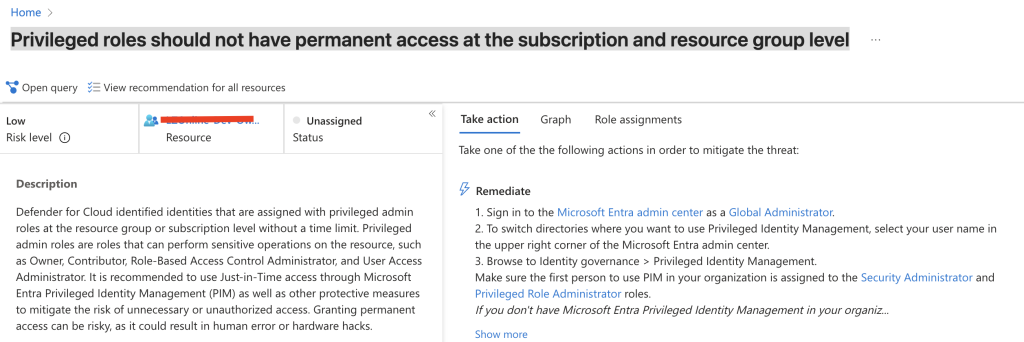
The assessmentKey maps to the recommendation assessment ID. For example, I used:
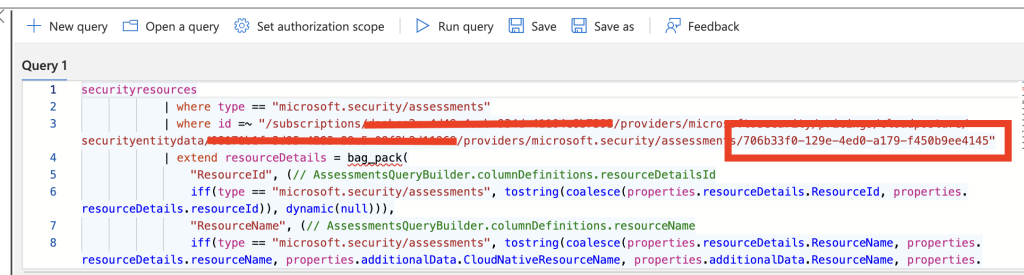
706b33f0-129e-4ed0-a179-f450b9ee4145for the recommendation “Privileged roles should not have permanent access at the subscription and resource group level”
Below pictures show how this maps in the Azure portal.
If you select Open query, you can validate that the assessment ID matches the assessmentKey from the exemption JSON:
In the next post I show how to create a new exemption using the same standardAssignments API:
Microsoft Defender for Cloud - Create exemptions using REST API
Have feedback on this post?
Send me a message and I'll get back to you.